What to prepare before you order a new website
A practical checklist of goals, content, photos, brand files, access, examples, budget and decisions that makes a website project faster, cheaper and more accurate to estimate.

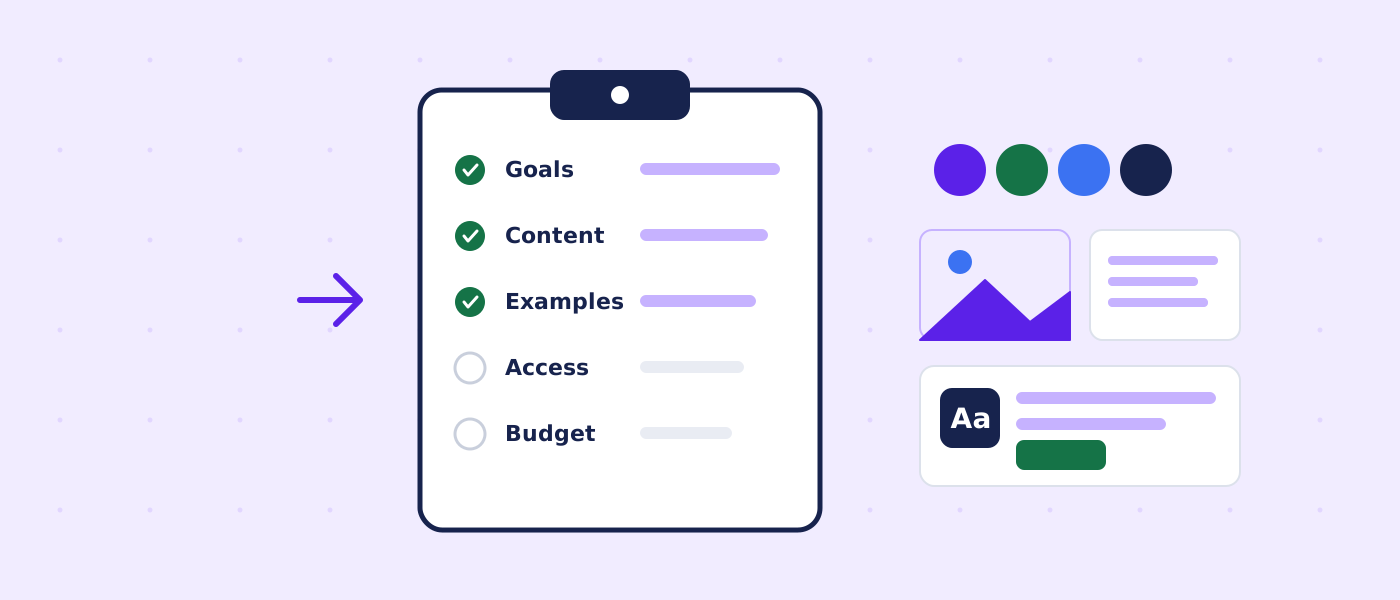
Quick answer: what to have ready
Most website projects do not stall because of design or code. They stall because someone is waiting for a text, a photo, a password or a decision. Preparing these things before you hire a developer shortens the project, makes the estimate more accurate and usually leads to a better site, because the work can focus on the structure and message instead of on chasing materials.
This guide lists everything worth preparing, why each item matters and how to handle it if you do not have it yet. You do not need all of it on day one. Rough versions are enough: they are easier to edit than a blank page.
| Subject | Relationship | Value |
|---|---|---|
| A website project | is usually delayed by | missing content, access and decisions more than by design or code |
| A clear goal | determines | page structure, calls to action and how success is measured |
| Rough text | is easier to edit than | writing from nothing |
| Real photos | usually build more trust than | generic stock images |
| Domain, hosting and analytics accounts | should be registered | in the business owner's name |
| A budget range | helps a developer propose | a realistic scope rather than a guess |
| One decision maker | prevents | conflicting feedback and extra revision rounds |
| Passwords | must never be sent | through a project form or plain email |
Why preparation saves time and money
A website is a set of decisions: what to say, to whom, in what order and with what proof. Each decision that is made late costs time, because the work depends on it. Each decision that is made twice costs money, because something is redone.
| Delay | What happens | Preparation that prevents it |
|---|---|---|
| Waiting for text | Pages are designed with placeholder copy, then reworked | Rough drafts or bullet points for each page |
| Waiting for photos | Generic images are used, then replaced | A folder of real photos with permission to use them |
| Waiting for access | Setup stops until the domain or hosting login is found | A list of accounts and who can grant access |
| Unclear goal | The site tries to do everything | One primary action and one or two secondary ones |
| Many opinions | Feedback contradicts itself | One person who approves |
| Late features | A booking system or store appears after design | A list of required functions at the start |
| Unknown budget | A proposal is too big or too small | A range, or the words "not sure yet" |
Preparation also makes quotes comparable. When several developers receive the same clear brief, their proposals can be compared on scope and price rather than on guesses.
Step 1: define the goal of the website
Start with what the website must do for the business. A site that tries to serve every purpose usually serves none well.
Choose one primary action
Ask what you want a visitor to do after reading a page. For a service business it might be to call, request a quote or book a visit. For a shop it is to buy. For a professional it might be to schedule a consultation. Write down one primary action and, at most, two secondary ones, such as downloading a guide or following a profile.
| Business type | Primary action | What the site needs |
|---|---|---|
| Home services (plumbing, HVAC, landscaping) | Call or request a quote | Phone number in the header, service area, quote form, proof of work |
| Professional services (accounting, legal, consulting) | Book a consultation | Clear services, credentials, scheduling or contact form, privacy information |
| Restaurant or cafe | View menu and find location | Menu in text, hours, map, reservation link |
| Clinic or wellness studio | Book an appointment | Services, practitioners, booking, directions, policies |
| Online store | Buy | Catalog, search and filters, checkout, shipping and returns |
| Nonprofit | Donate or volunteer | Mission, impact, donation path, contact |
Describe your audience
Write two or three sentences about who you serve: where they are, what they need, what worries them and how they usually find you. A page written for "everyone" convinces no one. A page written for a specific kind of customer can be direct and persuasive.
Decide how you will measure success
Pick numbers that reflect the goal: calls, form submissions, bookings, orders, or newsletter signups per month. Note the current numbers if you know them, even roughly. After launch they tell you whether the site is working.
- Write your primary action in one sentence
- List your top three customer types
- Note your current monthly leads or sales from the website, if any
- Define what a good result would look like after six months
Step 2: gather the substance: services, offers and proof
A website communicates what you offer and why someone should trust you. Collect that substance in plain notes before anyone designs a page.
List your services or products
For each service, write a short description in your own words: what it is, who it is for, what is included, what is not included and how pricing works. If you do not publish prices, write what influences the price so visitors understand why you ask for details.
State what makes you different
Resist generic claims such as "quality service" and "customer satisfaction". Concrete facts are stronger: years in business, specific certifications you hold, the area you serve, response times you can actually keep, warranty terms, materials you use, guarantees you provide. Only write what is true and verifiable.
Gather proof
- Real customer feedback, with permission to publish it and, where appropriate, the person's name and city
- Photos of finished work, preferably with a short caption describing the job
- Licenses, insurance, certifications and memberships you can show
- Awards or press mentions that you can link to
- Numbers you can stand behind, such as years of experience or jobs completed
Do not invent testimonials, ratings or client logos. They create legal risk and erode trust when discovered. If you have no proof yet, build the site around clear explanations and process, and add proof as it appears.
Collect real questions
Make a list of the ten questions customers ask most often before buying. They become the FAQ and often reveal the content that matters most. Check your email, call notes and chat messages for them.
| Question | Why it matters |
|---|---|
| What exactly do you do, and for whom? | Becomes the home page message |
| Where do you work (service area or location)? | Drives local pages and the contact section |
| How does the process work from first contact to completion? | Reduces uncertainty and calls |
| What does it cost, or what affects the cost? | Sets expectations and filters leads |
| How long does it take? | Answers a common objection |
| What do customers worry about before hiring you? | Shapes the FAQ and reassurance |
| Why should someone choose you over others? | Your real differentiators |
| What happens after the work is done? | Support, warranty and follow-up |
Step 3: prepare the content
Content is the part most likely to delay a project, so it deserves its own plan. The developer can build structure and design, but only you know the facts about your business.
What counts as content
- Page text: headings, descriptions, service explanations, an About page and a contact page
- Photos, illustrations and videos
- Logo and brand files
- Downloadable files, such as brochures or price lists, if you want them online
- Legal and policy text: privacy, terms, returns and shipping
- Contact details: address, phone, email, opening hours, service areas
Writing options
| Option | Effort for you | Result | Notes |
|---|---|---|---|
| You write it | Higher | Accurate and personal | Rough drafts are fine; ask for editing |
| Developer or editor edits your notes | Medium | Clear and consistent | Provide bullets and examples |
| Professional copywriter | Lower | Polished and persuasive | Needs a briefing and costs extra |
| Content migrated from the old site | Lower | Familiar but may be outdated | Review for accuracy and structure |
Whichever route you choose, agree early who writes what and by when. It is common for text to be the last item delivered and the first cause of delay.
Content readiness levels
Be honest about how ready your content is. It helps to describe it in one of three states.
| State | What it means | What the developer plans for |
|---|---|---|
| Ready | Texts and images exist and are approved | Placement and formatting only |
| Partly ready | Some pages written, some notes only | Editing and placement, with gaps flagged early |
| Needs writing | Starting from scratch | Time or budget for writing, or a copywriter |
A simple content tracker
A spreadsheet with one row per page works well: page name, purpose, owner, status, due date and link to the draft. Share it with the developer and update it weekly. It makes the project visible and keeps both sides honest about what is outstanding.
Step 4: photos, video and visual material
Visuals shape trust faster than text. Visitors judge a business in seconds, and photos of real people and real work answer the question "is this a real company?" better than anything else.
Prefer real images
Photos of your team, premises, products and finished work are more credible than generic stock photos of smiling people. If you have to use stock images, choose natural ones, use them sparingly and make sure the license allows commercial use. Keep a record of where each image came from.
What to collect
| Item | Notes | Tip |
|---|---|---|
| Team and owner portraits | Friendly and well lit | Ask for written permission to publish people's images |
| Premises and equipment | Exterior and interior | Shoot in daylight, tidy first |
| Finished work | Before and after where honest | Add a short caption: location type, task, result |
| Products | Clean backgrounds, several angles | Keep a consistent style |
| Process | Photos of the work in progress | Shows competence and transparency |
| Short video (optional) | Introduction or a demonstration | Host it appropriately; avoid autoplay |
Quality and format
Modern phone cameras are good enough for many business photos if the light is good and the lens is clean. Provide the original files rather than screenshots or images sent through messaging apps, which compress them. Large originals are welcome: the developer will resize and optimize them for the web.
Permissions and licenses
- Get written consent from anyone who can be identified in a photo or video
- Check that photographers have given you the right to use their work online
- Keep licenses for stock images and fonts
- Do not use images found through a search engine unless the license explicitly allows it
Step 5: brand files and visual identity
Brand assets give the site its look and keep it consistent with your other materials. If you have a logo and brand colors, collect them. If you do not, say so, and the project can include a simple starting set.
| Asset | Preferred format | Why |
|---|---|---|
| Logo | SVG or a high-resolution PNG, with a transparent background | Sharp at any size |
| Alternate logo versions | Light and dark, horizontal and stacked | Different header and footer needs |
| Favicon or icon | Square image | Browser tab and bookmarks |
| Brand colors | Hex codes or a brand guide | Consistent design |
| Fonts | Names and license information | Many fonts need a web license |
| Brand guidelines | Tone, spacing and usage rules | |
| Tone of voice notes | A few sentences | Keeps copy consistent |
If your logo exists only as a small image on a business card, tell the developer. It can often be recreated as a vector, but it is a task that should be planned for. If you have no brand yet, describe three adjectives that fit your business (for example, calm, precise, friendly) and two sites whose look you admire.
Step 6: plan the structure: pages and navigation
Structure is the skeleton of the site. You do not need a perfect sitemap, but a first outline saves time and helps estimate the project.
A typical page list for a small business
| Page | Purpose | Notes |
|---|---|---|
| Home | Explain who you help and what you do, and guide to action | Short, with the primary action clear |
| Services or products | Describe offers; one page per main service works well | Better for search than one long page |
| About | Show who is behind the business | Real people and real experience |
| Portfolio or case studies | Show finished work | Honest descriptions and permission to publish |
| Pricing or packages | Explain pricing logic | Optional but valuable |
| Contact | Provide a clear path to reach you | Phone, email, form, map or service area |
| Blog or resources | Answer common questions | Optional; needs ongoing effort |
| Legal pages | Privacy policy, terms, accessibility statement | Have them reviewed for your situation |
Start by listing your main services. Each important service usually deserves its own page, because people search for specific services and a page can match that specific need. A single page that lists everything is harder to read and to rank.
Navigation
Keep the main menu short, with five to seven items. Put the primary action, such as a phone number or a quote button, where it is always visible. Think about how a first-time visitor would look for information rather than how your company is organized internally.
If you already have a website
Share the address and, if possible, access to analytics and Search Console. List the pages that bring the most visitors and leads, and the pages you want to remove. This information protects existing search visibility and shapes the redesign. For more on this, see how to redesign a website without losing search traffic.
Step 7: collect examples and references
Examples are the fastest way to communicate taste and expectations. Words like "modern" and "clean" mean different things to different people. A few links make them concrete.
What to gather
- Three to five websites you like, from any industry
- A note about what you like on each: layout, colors, tone, specific features
- Two or three competitors or peers, and what you think they do well or badly
- Sites you dislike, and why
- Examples of specific features you want to copy in spirit, such as a quote calculator or a gallery
How to use references
References are for direction, not for copying. A good developer will explain the pattern behind what you like and apply it to your content and audience. Avoid asking for an exact copy of another site: it is legally risky, and it rarely fits your business.
| Vague wish | Better description |
|---|---|
| Make it modern | Plenty of white space, large photos, simple navigation, like sites A and B |
| Make it professional | Calm colors, clear fonts, real photos, concise text |
| Make it stand out | One bold color accent and distinctive headings, but easy to scan |
| Make it easy | A visible phone number and a three-field quote form on every page |
| Make it fast | No sliders or autoplay video; lightweight pages |
Step 8: define the functionality you need
Features are where estimates change the most. A contact form is simple; a booking system with payments is a project of its own. List what you need now, what you would like later and what you are unsure about.
| Feature | Questions to answer | What drives complexity |
|---|---|---|
| Contact or quote form | Which fields? Where do messages go? | Spam protection, email delivery, integrations |
| Online booking | Which system? Services, durations, staff? | Third-party tools, payment, time zones |
| Online store | How many products? Variants? Shipping rules? Taxes? | Catalog size, shipping and tax logic, payment providers |
| Payments | Which provider? One-time or recurring? | Security, refunds, compliance |
| Blog or news | Who writes? How often? | Categories, authors, editorial workflow |
| Multiple languages | Which languages? Who translates? | Content volume, structure, switching |
| Member area or login | What can members do? | Security, user management |
| Integrations (CRM, email, calendar) | Which tools? What data moves? | Accounts, APIs, testing |
| Search and filters | What do people look for? | Data structure, performance |
| Maps and locations | How many locations? | Data accuracy, local pages |
Mark each feature as must-have, nice-to-have or later. A launch with the essentials is better than a delayed launch with everything. Many features can be added after the first release without redoing the foundation, if the structure is planned for them.
Step 9: sort out domain, hosting, accounts and access
Technical accounts are the most common surprise in a project. Someone registered the domain years ago, someone else manages email, and nobody remembers which email address owns what. Sorting this out early prevents delays.
The ownership principle
The business should own its domain, hosting, analytics and key accounts. Registered in your name and with your email address, they remain yours if you change developers. A developer can be given access without owning the account. Be cautious if a provider insists on registering these in their own name.
| Account | What to find out | Who should own it |
|---|---|---|
| Domain registration | Where is it registered, when does it expire, who has the login? | The business |
| DNS | Where are DNS records managed? | The business, with access for the developer |
| Hosting | Which provider and plan? Is a new one needed? | The business |
| Business email | Which provider? Who administers it? | The business |
| Analytics and Search Console | Do they exist? Who has access? | The business |
| Google Business Profile | Is it claimed and verified? | The business |
| Social profiles | Which are active? | The business |
| Existing website platform | Admin access and a backup | The business |
| Third-party tools | Booking, payments, newsletters, chat | The business |
How to share access safely
- Never send passwords through a project form, a chat message or plain email
- Use the invitation or delegate-access features that most platforms offer, so the developer gets their own login
- If a shared credential is unavoidable, use a password manager's sharing feature and change the password afterward
- Turn on two-factor authentication for important accounts
- Remove access when the project ends or when someone leaves
This is also why the project forms on this site ask you not to include passwords or payment details.
Step 10: legal, privacy and accessibility basics
This section is general information, not legal advice. Requirements depend on your location, your industry and the data you collect. Ask a qualified professional about your situation.
Policies and notices
- A privacy policy that describes what personal information your website collects, why, how long you keep it and who receives it
- Terms of service or terms of sale, if you sell products or services online
- Cookie and tracking disclosures if you use analytics, advertising pixels or similar tools; some US state privacy laws and other regulations may require notices or choices
- Return, shipping and refund policies for stores
- Industry-specific notices, for example for health, finance or legal services
Accessibility
Accessible sites work for more people and reduce risk. A common target is conformance with the Web Content Accessibility Guidelines (WCAG) level AA. In practice this means readable contrast, keyboard operation, clear labels on form fields, meaningful alternative text for images and consistent navigation. Ask your developer how they approach it and whether they will provide an accessibility statement. Accessibility work reduces risk but cannot guarantee that no complaint will ever occur.
Copyright and licenses
Make sure you have the right to use every text, image, font and video that goes on the site. If a previous developer or agency created assets, check who owns them. Keep records of licenses.
Step 11: prepare for search visibility
A website that nobody can find has limited value. You do not need to become an SEO expert, but a few preparations help the developer build a site that search engines can understand.
- List the phrases customers use to describe your services, and the places you serve
- Share your Search Console and analytics access if they exist, and the list of pages that already bring traffic
- Provide your exact business name, address (if you have a public location), phone number and hours, and keep them identical everywhere
- Decide how you will handle old URLs if you are replacing a site, so redirects can be planned
- Think about topics you can write about based on real customer questions
A good developer will build the technical foundations: clean structure, titles and descriptions, fast pages, mobile layouts, a sitemap and indexing setup. If you want an independent review of an existing site first, a technical SEO audit can show what to fix.
| Detail | Why it matters |
|---|---|
| Service area (cities, states or regions) | Determines local pages and wording |
| Business name as used publicly | Consistency across the site and profiles |
| Phone number and email | Primary contact routes |
| Opening hours and holidays | Accuracy that visitors depend on |
| Licenses relevant to your area | Trust and compliance |
| Time zone for meetings and bookings | Avoids scheduling errors |
Step 12: set the budget and timeline
Budget and timing are the two numbers every proposal depends on. Sharing a range is not a weakness. It lets the developer suggest what is realistic and what to defer.
What drives the cost
| Driver | Lower cost | Higher cost |
|---|---|---|
| Number of pages | A handful of core pages | Dozens of unique pages |
| Design | Clean template customized to your brand | Fully custom layouts and illustrations |
| Content | You supply text and photos | Writing, photography and video produced for you |
| Features | Contact form and basic integrations | Booking, store, memberships, custom logic |
| Migration | New site without old content | Moving a large site and its redirects |
| Integrations | None or simple | CRM, payment, inventory, custom APIs |
| Accessibility and performance targets | Standard good practice | Strict audits and extensive testing |
| Ongoing support | Handover with a guide | Monthly maintenance and updates |
Ongoing costs to remember
- Domain renewal and hosting fees, paid to the providers directly
- Third-party subscriptions, plugins or paid themes
- Stock photos, licensed fonts or video
- Maintenance: updates, backups and small changes
- Content updates and new pages over time
A realistic timeline
| Phase | What happens | Your part |
|---|---|---|
| Brief and scope | Goals, pages, features and price are agreed | Answer questions, provide examples |
| Structure and design | Sitemap and key layouts are created | Review and give consolidated feedback |
| Build | Pages are developed on a staging link | Provide content and access |
| Review | You test the site and request agreed changes | Check on phone and desktop, test forms |
| Launch | Domain connected, checks done, handover | Approve and confirm |
| After launch | Monitoring and small fixes | Report issues, plan updates |
The timeline depends on the number of pages, the features and, above all, how quickly materials and feedback arrive. A developer can give an estimate only after reviewing your brief, not before. Be wary of fixed promises made without reading it.
Step 13: decide who decides
Websites are often delayed by feedback that arrives from many directions and contradicts itself. Decide at the start who has the final say and how feedback will be collected.
- Name one person who approves designs and content
- Collect comments from colleagues into a single document before sending them
- Agree on the number of revision rounds included in the scope
- Set review windows, for example three business days per round
- Keep decisions in writing so that nothing depends on memory
Clear decision-making also protects your budget. Each extra round of changes costs time, and changes outside the agreed scope are normally quoted separately.
Step 14: write the brief
A brief is a short document that brings everything above together. It does not need to be long. It needs to be specific.
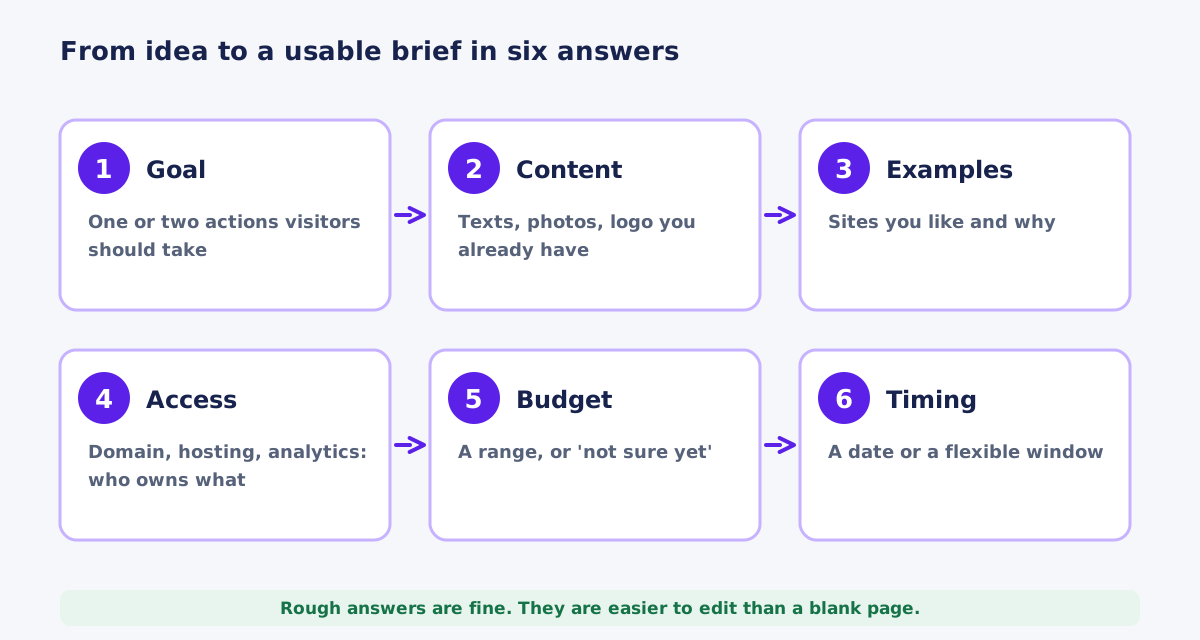
A simple brief template
- Business: name, what you do, where you work, how long you have operated
- Goal: the primary action and the main audience
- Current situation: existing website address, what works and what does not
- Services or products: the main ones, in order of importance
- Content status: ready, partly ready or needs writing; who will write
- Visuals: photos, logo, brand colors, and what is missing
- Examples: three sites you like and why
- Features: must-have, nice-to-have and later
- Accounts: domain, hosting, analytics, email; who owns them
- Budget and timing: a range or "not sure yet", and any fixed dates
- Decision maker: who approves, and how you prefer to communicate
The project brief form on this website follows the same structure in five short steps and does not require anything you do not have. You can say "not sure yet" to the budget and timing questions.
How to evaluate proposals
When proposals arrive, compare them on what they include, not only on the price.
| Element | Why it matters |
|---|---|
| Scope in plain language | Pages, features and deliverables, so there are no surprises |
| What is not included | Hosting, domain, copywriting, integrations and so on |
| Process and timeline | How the work will run and what you need to provide |
| Number of revision rounds | Keeps feedback within budget |
| Ownership and access | You own the site, content and accounts after payment |
| Payment terms | Deposit and milestones that are clear and proportionate |
| Support after launch | What happens when something breaks or needs changing |
| References or examples of real work | Evidence of relevant experience |
Red flags
- Guarantees of rankings, traffic or sales
- A price far below others with no explanation of what is excluded
- Refusal to let you own your domain and hosting accounts
- No written scope or contract
- Pressure to decide immediately
- Portfolio pieces that the person cannot explain or that belong to others
- No mention of testing, accessibility or performance
Mistakes that make projects harder
- Starting without a primary goal
- Assuming the developer will write all the content
- Using low-quality or borrowed images
- Registering the domain or hosting in someone else's name
- Sending passwords by email or through a form
- Letting too many people give feedback
- Adding features late without adjusting scope and timeline
- Skipping the review on a real phone
- Waiting until launch to think about legal pages
- Forgetting that a website needs maintenance after launch
- Not saving a copy of the old site before replacing it
The preparation checklist
Use this as a final check. Items you do not have yet are fine: note them as "to do" and tell the developer.
Strategy
- One-sentence primary goal
- Main customer types and what they need
- Current leads or sales from the website, if any
- Success measures for six months
Content
- List of services or products with short descriptions
- Your differentiators, stated with facts
- Customer questions for the FAQ
- Real testimonials with permission, if you have them
- Drafts or notes for Home, Services, About and Contact
- Policies: privacy, terms, returns and shipping
Visuals and brand
- Logo files (SVG or high-resolution PNG)
- Brand colors and fonts, or a note that you need help
- Photos of team, premises and finished work, with permission
- Three to five reference sites and what you like about them
Technical
- Domain registration details and who has the login
- Hosting provider, or a request for advice
- Analytics and Search Console access, if they exist
- Business email arrangement
- Existing website address and admin access
Project
- Feature list in three groups: must, nice, later
- Budget range or "not sure yet"
- Desired timing and fixed deadlines
- Name of the person who approves
- Preferred way and hours to communicate
If you are starting from scratch: a minimal first version
Some businesses have no website, no photos and no written material. That is a normal starting point, and it does not require a large project. A focused first version can be launched with a small set of pages and grown later.
| Included in version one | Added later when needed |
|---|---|
| Home page with a clear message and one primary action | A blog or resource section |
| One page per main service | Detailed case studies |
| About page with a real photo and short story | Team pages and careers |
| Contact page with phone, email and a short form | Online booking or payments |
| Privacy policy and basic legal pages | Additional languages |
| Basic metadata, sitemap and analytics | Advanced integrations and automation |
Launching a simple, honest site and improving it based on real inquiries usually beats waiting months for a perfect one. Each new page or feature can be justified by what customers actually ask for.
Working with a remote developer in another time zone
Many small businesses hire developers who work remotely, sometimes across the Atlantic. This works well when expectations are explicit. A few practices make the collaboration smooth.
- Agree on overlapping hours for calls, for example your morning, and on how quickly messages are normally answered
- Keep decisions and scope in writing, in a shared document or email thread, so nothing depends on memory
- Use a staging link so you can review progress on your own devices at any time
- Confirm how invoices and payments work, including the currency
- Make sure accounts such as domain, hosting and analytics are registered in your name from the start
- Ask how emergencies are handled after launch and what counts as an emergency
Time differences can be an advantage: work progresses while you are offline, and feedback you send in the evening can be addressed by the next morning. The key is clarity about who does what and when.
How the process works with me
When you send a brief, I read it and reply with questions or a proposed scope. I work directly with you from the brief to launch: structure and design, build on a staging link, your review, launch checks and handover. If something on your list is missing, we plan for it rather than stall. You can see what I offer on the website design page, and the process page explains the steps.
Frequently asked questions
Do I need to write all the content before hiring a developer?
No. Rough notes and bullet points are enough to start. What matters is knowing who will write what and when. Content that arrives late is the most common cause of delay, so plan it early.
What if I do not have a logo or brand colors?
Tell the developer. A simple logo and color set can be created as part of the project or by a designer, and it is better to plan for it than to discover the gap in the middle of the build.
Is it better to use stock photos or my own?
Your own photos of real people and real work usually build more trust. Use stock images sparingly, choose natural ones and check the license.
Should I share my passwords with the developer?
Do not send passwords through forms or plain email. Use the invitation or delegate-access features of your accounts, or a password manager's sharing option, and turn on two-factor authentication.
How much should I budget?
It depends on pages, design, content, features and migration. Share a range with your brief, or say you are not sure yet. A developer can then propose a scope that fits and explain what to defer.
How long does a website project take?
It depends on scope and on how fast materials and feedback arrive. A small site can take a few weeks, a larger one longer. A timeline should be agreed after reviewing your brief, not before.
Do I need legal pages on my website?
Most sites that collect personal information need at least a privacy policy, and stores need terms and return information. Requirements depend on your location and industry, so ask a qualified professional to review them.
What happens after the website launches?
You should receive access to everything and a short guide. Sites also need ongoing care: updates, backups, checks and content changes. You can handle that yourself or arrange a maintenance plan.

Website Design
A new site with a clear page structure, mobile layouts and a working contact path.
Independent web developer and SEO specialist since 2010. Based in Kyiv, Ukraine, working remotely with US businesses.
More about me