Category pages: the most underused SEO asset in online stores
Product pages get the attention, but category pages usually match what buyers search for. A practical guide to category structure, intro copy, filters, pagination, internal links and measurement.

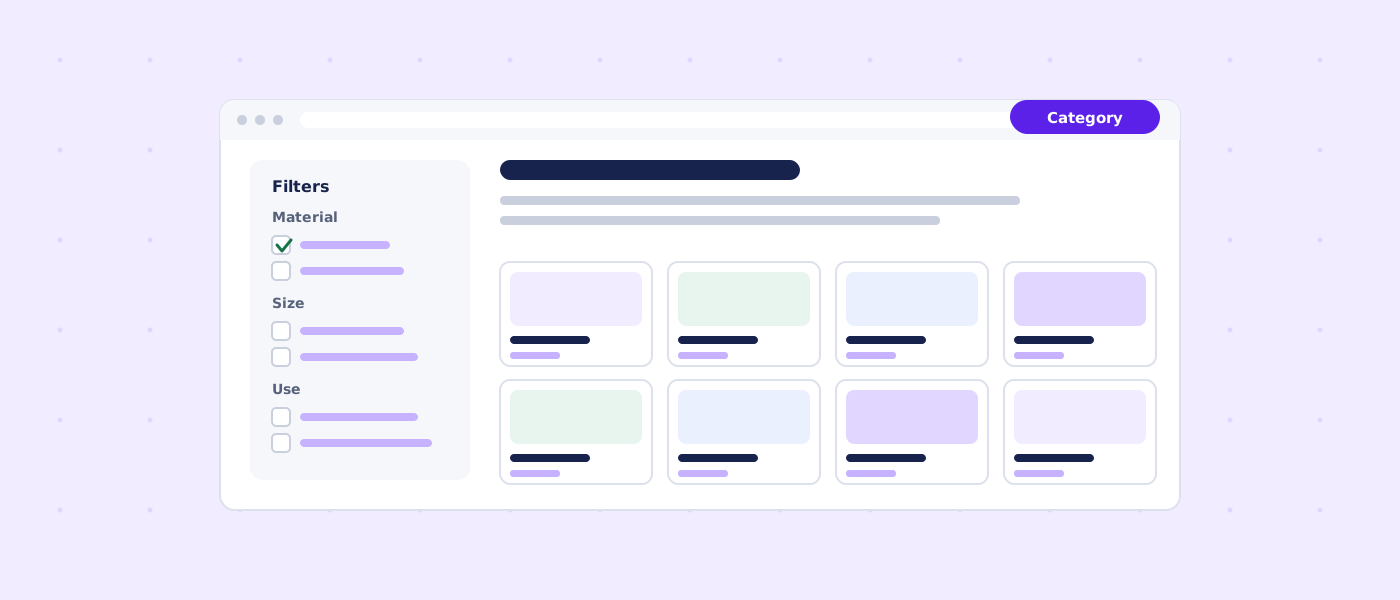
Quick answer: why category pages deserve more attention
In most online stores the product pages are polished and the category pages are an afterthought: a heading, a grid of thumbnails and a pagination bar. Yet when people search for something to buy, they rarely type a specific product code. They type a type of product plus a qualifier: material, size, use, price range, brand, or a problem they want to solve. Those queries match category pages far better than individual product pages.
This guide explains how to turn category pages into the strongest organic landing pages of an online store. It covers structure, copy, filters, pagination, internal links, structured data, out-of-stock handling and measurement. The advice applies to Shopify, WooCommerce, BigCommerce, Magento and custom stores, with platform-specific notes where behavior differs.
| Subject | Relationship | Value |
|---|---|---|
| Shoppers | usually search for | a product type plus a qualifier, not a single SKU |
| A category page | can satisfy | commercial investigation queries such as "waterproof trail running shoes" |
| A product page | best matches | a specific item or exact model query |
| Faceted filters | can create | thousands of near-duplicate URLs |
| An indexable filter page | needs | real demand, stock and a unique heading and intro |
| Paginated pages | should use | ordinary links and a self-referencing canonical |
| Product structured data | belongs on | pages about a single product, not on category listings |
| Category intro text | helps | visitors choose and helps search engines understand the page |
How shoppers search and which page answers which query
Search intent for e-commerce falls into a few groups. Matching the intent to the right page type is the first decision, and it prevents two pages from competing for the same query.
| Intent | Example query | Best page | What the page must do |
|---|---|---|---|
| Broad discovery | running shoes | Top-level category | Orient the visitor and lead to subcategories |
| Commercial investigation | waterproof trail running shoes | Subcategory or filter landing page | Compare options, explain how to choose |
| Brand plus type | acme trail shoes | Brand category | Show the brand range and differences |
| Problem solving | shoes for wide feet | Category or guide linked from it | Offer a filtered selection and advice |
| Specific model | acme trailmaster 2 men's | Product page | Give complete specifications, price and availability |
| Research | how to choose trail running shoes | Guide or blog article | Teach, then link to the category |
| Local or delivery | running shoes same day delivery | Category with delivery information | State shipping and returns clearly |
A common problem is a blog article trying to rank for a transactional query while the category page for that product type has two lines of text. Reverse the roles: let the category page answer the commercial query and let the article support it with deeper advice and a clear link.
Why product pages are a weaker match for broad queries
A product page describes one item. For a broad query it can look narrow, and a store with 500 similar products produces 500 competing pages with little unique text. A category page consolidates relevance: it can mention the range, link to every variant and carry the cumulative authority of its products and links.
Why category pages are often neglected
- They are generated by the platform with default templates
- Nobody owns them: merchandising, marketing and development all assume someone else does
- Writing copy for fifty categories feels harder than for five best-selling products
- The impact is harder to attribute than a paid campaign
- Platform defaults hide the intro text area in a place few people notice
Anatomy of a high-performing category page
A good category page serves two audiences at once: a hurried shopper who scans the grid and a careful buyer who wants help deciding. It also gives search engines clear signals. The elements below form a template you can apply across the store.
| Element | Purpose | Notes |
|---|---|---|
| Descriptive H1 | States the topic in the shopper's words | One H1; avoid stuffing |
| Short intro above the grid | Two or three sentences on range and how to choose | Keep the grid visible without scrolling on mobile |
| Breadcrumbs | Show hierarchy and aid navigation | Mirror the real category path |
| Product grid | Let visitors compare quickly | Consistent image sizes, clear price, availability |
| Filters and sorting | Narrow the selection | Useful filters first; keep crawl rules in mind |
| Subcategory links | Guide deeper browsing | Use descriptive anchor text |
| Buying advice below the grid | Longer guidance for people who need it | Headings, lists and a small table work well |
| FAQ | Answer real pre-sale questions | Delivery, returns, sizing, compatibility |
| Related categories | Strengthen internal linking | Link to genuinely related ranges |
| Structured data for breadcrumbs | Explain hierarchy to search engines | Must match visible breadcrumbs |
The above-the-fold balance
Shoppers expect to see products almost immediately. A long essay above the grid pushes the products away and hurts conversion. The best pattern is a short, useful intro (often 40 to 90 words) at the top and the longer buying guide below the grid, where it supports the page without blocking it.
A title that helps both people and search results
The title tag appears in search results and should describe the page in natural language. For a category it often works to combine the product type, a qualifier and the store name, for example: "Trail Running Shoes for Men and Women | Example Store". Avoid repeating the keyword several times. Write for a person who is deciding whether to click.
Keyword research for category pages
Keyword research for categories is about vocabulary and structure rather than finding one magic phrase. You are deciding which products belong together under which name, and which names deserve their own page.
Gather the language of your customers
- Search Console queries that already show impressions for your category pages
- Search suggestions and related searches for each product type
- Your own site search logs: what visitors type when they cannot find something
- Customer questions from email, chat and support
- Competitor category names and filter options
- Marketplace categories and filters for the same products
Group by intent and by shared product set
Two queries belong on the same page when the same products satisfy them. "Men's trail shoes" and "trail running shoes for men" are the same page. "Waterproof trail shoes" may deserve its own page if enough products and demand exist and the experience differs. Merge variants that mean the same thing and separate those that need different products or advice.
| Question | If yes | If no |
|---|---|---|
| Is there a distinct set of products? | Consider its own category or filter page | Target the phrase on the parent page |
| Is there measurable search demand? | Create a page with unique content | Mention naturally in the parent copy |
| Can you keep it in stock? | Safe to publish | Hold until inventory is reliable |
| Would the page differ meaningfully? | Write a unique heading and intro | Avoid near-duplicate pages |
| Can you maintain it? | Add to the editorial calendar | Skip for now |
Avoid keyword cannibalization
Cannibalization happens when two or more of your pages target the same query, so none of them ranks as well as one consolidated page would. Typical sources are overlapping categories, a filter page that duplicates a subcategory, or a blog post that targets the same phrase as a category. Use a spreadsheet that lists the main query per URL, and resolve duplicates by merging, redirecting or differentiating the intent.
Writing category copy that helps shoppers
Category copy is often either missing or written to please a search engine. Neither helps. The goal is to help someone choose, in plain language, with specifics that show you understand the products.
A short intro above the grid
Cover three things in two to four sentences: what is in the range, who it suits and the main way to choose. Use the main phrase once, naturally. Add one useful fact: delivery speed, a size guide link, or a note about materials.
Example intro for a hypothetical store: "Trail running shoes with extra grip for loose ground, mud and roots. Browse by fit, cushioning and weather protection, or read our short guide to choosing the right pair. Free returns within 30 days." Replace the specifics with your own policies. Do not copy examples that do not match your business.
A buying guide below the grid
The longer section can answer questions that stop people buying: how to size, what the features mean, how products differ, what accessories are needed and how to care for the product. Structure it with subheadings so people can skim. A comparison table of the main variants is useful and also easy for search engines to parse.
| Feature | Road shoes | Trail shoes | Hiking shoes |
|---|---|---|---|
| Typical surface | Pavement and tracks | Dirt, mud, roots | Mixed terrain, heavier loads |
| Outsole | Smooth, light tread | Deep, aggressive lugs | Durable, stiff sole |
| Weight | Lightest | Medium | Heaviest |
| Weather protection | Usually breathable | Often water-resistant options | Often waterproof options |
| Best for | Speed and distance on roads | Off-road running | Walking with a pack |
Use real expertise, not filler
The most useful category content reflects genuine knowledge. If you stock the products, you know which questions customers ask. Put the answers on the page. This also supports the experience and trust signals that Google's quality guidance describes: first-hand knowledge, clear policies and accurate information.
Keep copy unique
Do not paste manufacturer descriptions across many categories, and do not reuse the same paragraph with one word swapped. If you have fifty categories, write at least the intro for each. Use templates for structure, not for sentences.
Category structure and URLs
A clean hierarchy is easier for shoppers to navigate and for search engines to crawl. The structure should reflect how customers think about products, not how your warehouse is organized.
Depth and breadth
Most small and mid-sized stores work well with two to three levels: department, category and sometimes subcategory. Every extra level adds a click. Important categories should be reachable from the home page in one or two clicks. Avoid deep trees where a product sits five levels down.
Naming
- Use the words customers use, not internal product codes
- Be specific enough to be unique: "Men's trail running shoes" rather than "Footwear 2"
- Keep naming consistent in menus, headings, breadcrumbs and URLs
- Avoid the same product appearing under many different names
URL patterns
A readable URL helps people and gives a small signal of the topic. Keep it short, lowercase and stable. Avoid session IDs, tracking parameters and unnecessary folders. Choose one pattern and keep it for years: changing category URLs later requires redirects and risks losing equity.
| Pattern | Example | Comment |
|---|---|---|
| Flat category | /trail-running-shoes/ | Simple; works well for small stores |
| Hierarchical category | /shoes/trail-running/ | Mirrors breadcrumbs; keep depth modest |
| Platform prefix | /collections/trail-running-shoes | Common on some platforms; stay consistent |
| Filter parameter | /shoes/?material=gore-tex&size=42 | Needs crawl rules; do not index by default |
| Session or tracking | /shoes/?utm_source=email | Must canonicalize to the clean URL |
Breadcrumbs
Breadcrumbs show where a page sits in the hierarchy. They help visitors move up a level and give search engines extra context. Use real links, keep them consistent with the URL structure and mark them up with BreadcrumbList structured data that matches what is visible.
Faceted navigation: filters without chaos
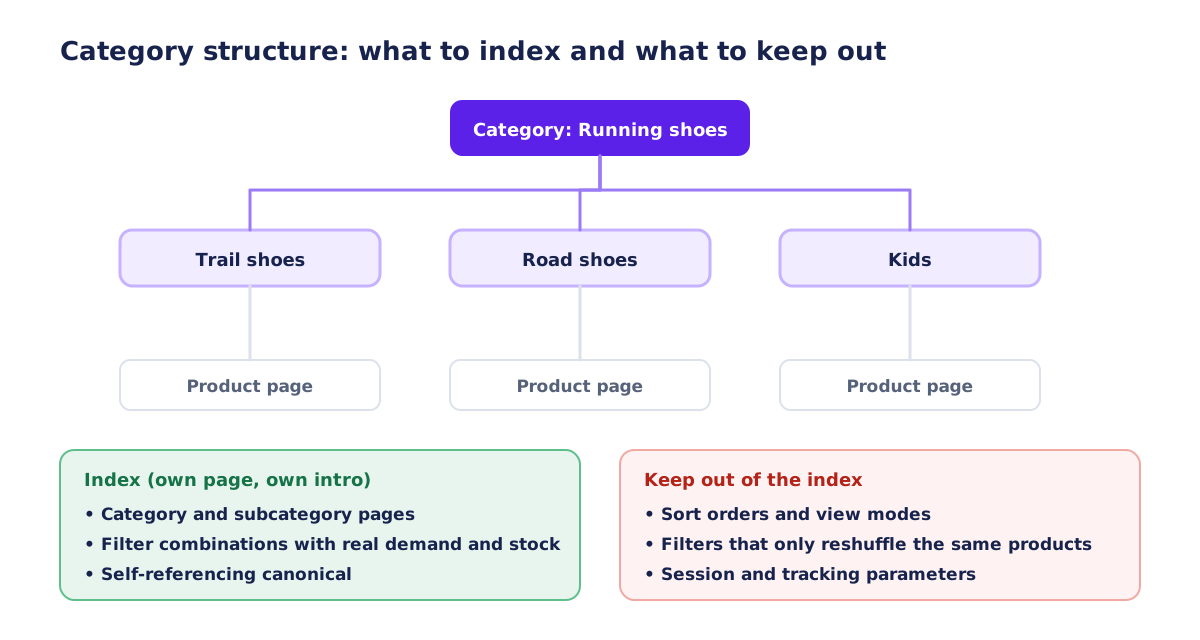
Filters are essential for shoppers and a hazard for crawling. Each combination of filters can produce a separate URL. Three filters with ten options each can create thousands of pages that show the same few products in different order. Search engines can waste crawl effort on them, and your site can dilute its own relevance.
Decide which filter pages deserve to be indexed
Some filter combinations match real searches and deserve a page. "Waterproof trail running shoes" is a good candidate if you stock several. Others merely reshuffle: sorting by price, switching view mode, or selecting five attributes at once. The rule of thumb is to index a filter page only when it has demand, stock, a distinct selection of products and the ability to carry its own heading and short intro.
| URL type | Example | Recommended handling |
|---|---|---|
| Main category | /shoes/ | Index; self-referencing canonical |
| Valuable filter landing page | /shoes/waterproof-trail/ | Index as a proper page with unique heading and intro |
| Sort order | ?sort=price-asc | Canonical to the base page; avoid linking prominently |
| View mode | ?view=list | Canonical to the base page |
| Multi-filter combination | ?color=red&size=42&brand=a | Do not index; limit crawl via parameters or robots rules |
| Internal search results | /search?q=trail | Usually noindex; keep out of crawl paths |
| Tracking parameters | ?utm_campaign=spring | Canonical to the clean URL |
Tools for controlling filter URLs
Several mechanisms exist, and they work differently. A canonical tag consolidates signals but does not stop crawling. A noindex tag keeps a page out of the index but the page must still be crawled to be seen. A robots.txt disallow rule stops crawling but a blocked URL may still be indexed without content if it is linked elsewhere, and crawlers cannot see a noindex on a blocked page. Choose deliberately and avoid combining conflicting signals, such as noindex plus a canonical to a different page.
- Render filter links as links only where you want crawlers to follow them
- Use JavaScript-driven filtering that does not generate crawlable URLs for low-value combinations, while keeping real URLs for the valuable ones
- Block infinite parameter spaces (for example sort and view parameters) in robots.txt if they waste crawl effort
- Canonicalize near-duplicates to the main category
- Keep the sitemap limited to pages you actually want indexed
Platform behavior differs
Every platform handles filters, collections and parameters differently, and defaults change with updates. Check what your platform generates by crawling the store and reviewing the URL patterns. Do not assume the default configuration is safe.
Pagination and infinite scroll
Large categories span multiple pages. Google no longer uses rel=prev and rel=next as an indexing signal, so pagination now relies on ordinary links and clear signals.
- Use real links (anchor elements with href) to the next and previous pages and to specific page numbers
- Give each paginated page a self-referencing canonical rather than pointing all pages to page 1
- Keep titles and headings clear, for example by adding "Page 2" to the title tag
- Do not noindex paginated pages if they lead crawlers to products that are not linked elsewhere
- Make sure products are reachable through more than one path, such as subcategories and internal links
Infinite scroll and "load more"
These patterns are convenient for users but invisible to crawlers unless real links exist. If you use infinite scroll, provide paginated URLs as a fallback that crawlers can follow, and update the address as the user scrolls. Test with a crawler that does not run JavaScript to see what is discoverable.
| Approach | Crawlable | User experience | Recommendation |
|---|---|---|---|
| Numbered pages with links | Yes | Predictable | Good default |
| Load more button with fallback links | Yes | Smooth | Good if fallback exists |
| Infinite scroll without URLs | No | Smooth | Avoid |
| View all page | Yes | Heavy for large sets | Only for small categories |
Internal linking for category pages
Internal links tell search engines which pages matter and how topics relate. Category pages are natural hubs, and a deliberate linking pattern multiplies their effect.
Link down, up and sideways
- Down: from a category to its subcategories and best-selling or featured products
- Up: from products and subcategories back to the parent category through breadcrumbs and contextual links
- Sideways: to related categories that shoppers often browse together
- From the home page and the main menu to the most important categories
- From buying guides and blog articles to the relevant category with descriptive anchor text
Anchor text
Use natural, descriptive link text such as "waterproof trail running shoes" instead of "click here" or "learn more". Vary the wording slightly where it reads naturally. Overly repetitive exact-match anchors look forced.
Avoid orphan products and orphan categories
A page that no internal link points to is easy to overlook. After a crawl, filter for pages with no inlinks and fix them: add them to a category, a related list or a guide, or remove them if they are obsolete.
Listing page experience that supports SEO and sales
A category page that loads quickly and makes comparison easy converts better, and users who stay engaged send positive signals indirectly. Pay attention to the details below.
Images
Product thumbnails are usually the heaviest part of a category page. Use properly sized images, modern formats, lazy loading below the fold and width and height attributes to prevent layout shifts. Descriptive file names and alt text help accessibility and image search.
Information density
Show what shoppers need to compare: name, price, availability, a key attribute (such as size range or material) and a clear indicator for sale items. Avoid hiding crucial details behind hover states that do not exist on touch devices.
Sorting and defaults
A sensible default sort, such as popularity or relevance, usually outperforms alphabetical or newest-first. Make sorting available but keep sorted URLs from creating duplicate indexable pages.
Mobile first
Most store traffic arrives on phones. Make filters accessible in a drawer, keep tap targets large, and check that the grid works with two columns without clutter. Google predominantly uses the mobile version of a page for indexing, so mobile content must match desktop.
| Question | Good sign | Warning sign |
|---|---|---|
| Do products appear within the first screen on mobile? | Yes | Intro text pushes the grid far down |
| Are filters usable with a thumb? | Large controls, clear apply button | Tiny checkboxes |
| Is the page fast? | Images lazy-loaded and sized | Dozens of full-size images |
| Is the H1 clear? | Specific and natural | Generic or keyword stuffed |
| Can crawlers reach all products? | Links to every page of results | Only infinite scroll |
Structured data for category pages
Structured data helps search engines interpret a page, but it must reflect what is visible. For category pages, the most useful and safe type is BreadcrumbList. Product markup belongs on pages about a single product, not on a page that lists many products, and Google's guidelines say that product rich results are for pages dedicated to one product.
| Type | Page | Notes |
|---|---|---|
| BreadcrumbList | Category, subcategory, product | Must match the visible breadcrumb trail |
| Product with Offer | Product pages | Price, currency and availability must match the page |
| ItemList | Category pages (optional) | Can describe the ordered list of products; no rich result promised |
| Organization or WebSite | Home page | Only with real, verifiable details |
| FAQPage | Pages with a visible FAQ | Does not guarantee rich results |
Validate markup with Google's Rich Results Test and the Schema Markup Validator and monitor Search Console enhancement reports for errors. If your platform adds Product markup to listing pages by default, review whether it is appropriate.
Out-of-stock and discontinued products
Products come and go, and the way you handle them affects category pages and the pages that carry their links. A category page that fills with unavailable items frustrates shoppers and weakens the page.
| Situation | Product page | Category page | Notes |
|---|---|---|---|
| Temporarily out of stock | Keep the page, show status, offer a back-in-stock alert | Show or move to the end; label clearly | Keeps accumulated relevance |
| Seasonal item | Keep the page live with a note about return | May hide off-season items | Avoid deleting seasonal pages |
| Permanently discontinued, replacement exists | 301 to the closest replacement or category | Remove from grid | Redirect to a relevant page, not the home page |
| Permanently discontinued, no replacement | Show a helpful page with alternatives, or return 410 later | Remove from grid | Decide by traffic and links |
| Product variant out of stock | Show the available variants first | Do not duplicate listings | Keep one canonical product URL |
Avoid blanket deletion. A discontinued product page with external links is an asset. Redirect it to the most relevant alternative, or keep it live with a clear explanation and suggestions.
Speed and Core Web Vitals on listing pages
Category pages are among the heaviest pages in a store because they combine many images, scripts and filter logic. The commonly cited "good" thresholds are Largest Contentful Paint at or below 2.5 seconds, Interaction to Next Paint at or below 200 milliseconds and Cumulative Layout Shift at or below 0.1, evaluated on real-user data.

- Serve properly sized thumbnails and use modern formats
- Give the first row of products priority and lazy-load the rest
- Reserve space for images and badges to avoid layout shifts
- Defer non-essential scripts, such as chat widgets and reviews, until after interaction or load
- Make filter interactions respond quickly; avoid reloading the whole page where possible
- Cache category pages where the platform supports it
If speed is a recurring problem, a focused website speed optimization project usually finds the biggest wins in images, scripts and loading order.
Trust signals, policies and reviews on category pages
Shoppers deciding between two stores look for reassurance quickly. Category pages are often the first page of your site they see, so the signals that reduce risk belong there, in a form that does not clutter the grid.
- Delivery information: typical delivery windows, free-shipping thresholds and cut-off times, stated in text
- Returns: the length of the return window and who pays for return shipping
- Payment options and security cues in the footer or a short strip under the intro
- Contact options: a visible way to ask a pre-sale question
- Real customer feedback where you have it, with the source and date, never invented or copied
- Warranty or guarantee terms when they are part of the offer
Keep these statements accurate and consistent with your policy pages. If shipping times change, update every page that mentions them. Inaccurate claims create customer service problems and, in some jurisdictions, legal ones.
Reviews and ratings
Product reviews belong on product pages. On category pages you can show an average rating next to each product if your platform supports it. If you add review markup, follow the search engine's guidelines: it must reflect genuine reviews of the product shown on that page, and a rating for the store itself should not be marked up on category pages.
Merchandising and SEO: how the two teams can work together
Merchandisers decide which products appear first and which are promoted. SEO cares about how the page is understood and found. The two goals support each other when the rules are clear.
| Topic | Merchandising wants | SEO wants | A workable compromise |
|---|---|---|---|
| Product order | Promote margin or new arrivals | A stable page that answers the query | Keep best matches at the top and rotate featured items within the first rows |
| Banners | Seasonal campaigns | Fast page, clear H1 | Use lightweight banners below the heading; no banner replaces the H1 |
| New categories | Test ideas quickly | Avoid thin duplicate pages | Add a short brief for demand, stock and copy before publishing |
| Retiring categories | Clean up the menu | Preserve links and relevance | Redirect to the closest category and note it in the change log |
| Filters | Many options | Controlled crawling | Offer the filters, with crawl rules for low-value combinations |
A one-page checklist that both teams use before launching or retiring a category prevents most conflicts. It should ask for the main query, the products that belong, the intended parent, the intro copy, the redirect plan and the review date.
Seasonal, sale and campaign categories
Sale and seasonal pages deserve special treatment because they are temporary by nature yet attract searches every year. A page that is deleted after the season loses its history, while a page that is kept and refreshed accumulates relevance.
Keep one permanent URL per recurring event
If you run a sale every autumn, keep a single permanent address such as /sale/ or /autumn-sale/ and update its content each year, rather than creating /sale-2026/, /sale-2027/ and so on. Use the page outside the season too, with a short note about when the next sale is expected and links to the regular categories.
Handle expired campaigns cleanly
- When the campaign ends, change the heading and intro to reflect the status
- Link to the current best alternatives so visitors still find something useful
- Do not leave expired prices visible
- If you retire the page permanently, redirect it to the closest relevant category
Clearance and outlet pages
A clearance category often contains products that also appear in the regular categories. Keep one canonical product URL and avoid duplicating the product pages themselves. The clearance page is a listing that links to the same product URLs, which keeps relevance consolidated.
Measuring category page performance
You cannot manage what you do not measure. Set up reporting that separates category pages from product pages and shows both traffic and sales.
Segment in Search Console
Use the Performance report with a page filter for your category path (using "URLs containing" or a regular expression). Record clicks, impressions, click-through rate and average position per category. Compare periods of the same length, preferably a year apart to account for seasonality.
Key metrics
| Metric | Source | What it tells you |
|---|---|---|
| Impressions per category | Search Console | How often the page is shown |
| Click-through rate | Search Console | Quality of title and snippet |
| Average position | Search Console | Direction of visibility, not a precise rank |
| Organic sessions to category pages | Analytics | Actual visits |
| Add-to-cart and purchase rate from category pages | Analytics, store reports | Whether the page helps people buy |
| Revenue from category landing sessions | Analytics e-commerce | The business outcome |
| Indexed category and filter URLs | Search Console | Whether crawl rules work |
Test changes one group at a time
When you rewrite intros or change titles, change a defined group of categories and leave a similar group untouched for comparison. Wait several weeks before judging, because search results fluctuate. Keep a change log so you can connect movements to actions.
A worked example: improving one category page
Imagine a small store that sells running gear. The category "Trail running shoes" has a default title ("Trail Running Shoes"), a thin intro and filters that create dozens of parameter URLs. The improvement plan could look like this.
- Review Search Console queries for the page and note phrases such as "waterproof trail running shoes" and "trail shoes for wide feet"
- Rewrite the title tag to describe the range and a key benefit, and keep it within a length that displays well
- Write a short intro with the range, a choosing tip and the delivery and returns note
- Add a buying guide below the grid with subheadings for fit, cushioning and weather, plus a comparison table
- Create two filter landing pages for the strongest demand (waterproof, wide fit), each with its own heading and intro
- Canonicalize sort and view parameters and keep multi-filter combinations out of the index
- Link from the home page, from the road running category and from two articles to the new pages
- Compress the thumbnails and defer a chat widget on listing pages
- Add BreadcrumbList markup if it is missing and validate it
- Record the baseline and review results after four to eight weeks
None of these steps needs a redesign. They are content, structure and configuration changes that a small team can complete in a few weeks.
Platform notes
The principles above are platform-neutral, but implementation details differ. Always verify on your own store.
| Platform type | Typical strengths | Check carefully |
|---|---|---|
| Hosted store builders | Fast setup, built-in canonical handling | Default URL prefixes, filter URLs, limited control of templates |
| WordPress with a store plugin | Flexible content and templates | Duplicate category or tag archives, plugin-generated URLs, speed |
| Enterprise or open-source platforms | Powerful faceted navigation | Default parameter explosion, crawl budget, complex templates |
| Custom builds | Total control | Everything must be implemented deliberately |
Mistakes to avoid
- Leaving category pages as a bare grid with no introduction
- Writing generic filler copy that could belong to any store
- Letting every filter combination become an indexable page
- Using noindex and canonical signals that contradict each other
- Pointing all paginated pages to page 1 with a canonical
- Hiding the only path to products behind infinite scroll
- Deleting discontinued product pages that still have links
- Creating two categories for the same intent
- Changing category URLs without redirects
- Adding Product markup to listing pages
- Measuring only product-page traffic and ignoring categories
A 30-day plan for a small store
| Week | Focus | Deliverables |
|---|---|---|
| 1 | Audit and baseline | Crawl, URL list, Search Console export, category performance table, top ten opportunities |
| 2 | Structure and rules | Naming fixes, canonical and parameter rules, pagination review, internal link plan |
| 3 | Content | Titles, intros and buying guides for the top categories; two filter landing pages |
| 4 | Speed and measurement | Image and script fixes, structured data check, reporting dashboard |
How I can help
I build and fix online stores as part of my work, and category pages are one of the first places I look. A technical SEO audit can show how your categories, filters and pagination are being crawled today and give you a prioritized list of fixes. If you need new templates or a rebuild, see website design, or send a brief describing your store.
Frequently asked questions
Should category pages have text on them?
Yes, but in moderation and with purpose. A short intro helps shoppers and search engines understand the range, and a longer buying guide below the products can answer questions. Avoid filler. The text should help someone choose.
Where should the category description go?
A brief introduction near the top, below the heading, and a longer section below the product grid. This keeps products visible while still supplying useful content.
Should I index filter pages?
Only when a filter combination matches real search demand, has enough products in stock and can have its own heading and introduction. Most filter and sort URLs should not be indexed.
Is rel=prev and rel=next still needed for pagination?
Google no longer uses them as an indexing signal. Use ordinary links between pages, give each page a self-referencing canonical and make sure products are reachable.
Can I use Product schema on a category page?
Product structured data is intended for pages about a single product. For category pages use breadcrumb markup and, optionally, ItemList. Check platform defaults that may add Product markup to listings.
What should I do with out-of-stock products?
For temporary stockouts keep the page and show availability, with an alert option. For permanent discontinuation redirect to the closest relevant product or category, or show a helpful page with alternatives.
How long does it take to see results from improving categories?
Search engines need time to recrawl and reevaluate. Expect several weeks before judging, and compare against your baseline for the same period of the previous year to account for seasonality. Results cannot be guaranteed.
How many categories should a small store have?
Enough to match how customers search, with each category supported by a distinct set of products. Many small stores perform well with a handful of main categories and a limited number of subcategories rather than dozens of thin pages.

Technical SEO Audit
A prioritized list of technical issues (indexing, structure, metadata) with what to fix first.
Independent web developer and SEO specialist since 2010. Based in Kyiv, Ukraine, working remotely with US businesses.
More about me