How to redesign a website without losing search traffic
A redesign changes URLs, content and structure at once. This is the full plan I use to protect rankings and inquiries: baseline, URL inventory, redirect map, staging, launch day and the first 30 days.

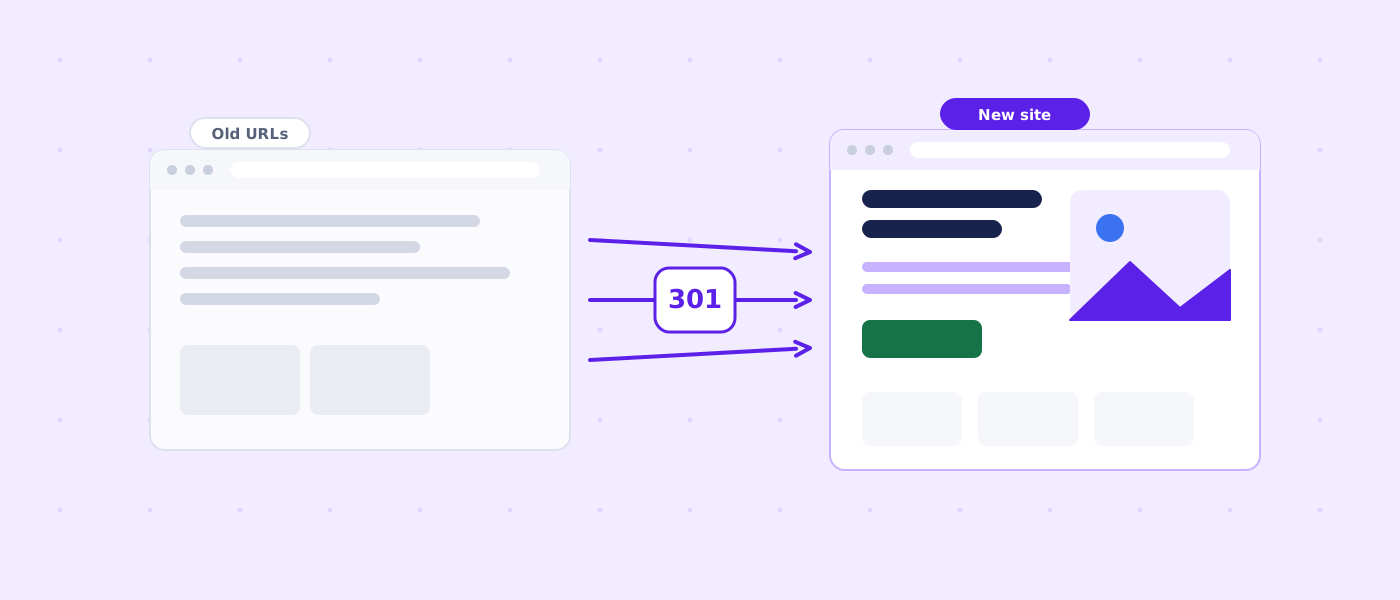
Quick answer: what protects traffic during a redesign
A website redesign does not hurt search traffic by itself. Traffic drops when the redesign removes, moves or rewrites the things search engines and visitors already rely on: addresses, text, links, speed and tracking. If you keep those stable, or move them in a controlled way, a redesign can be neutral or even positive. If you change them carelessly, rankings can fall within days and take months to recover.
This guide is the plan I follow for small business websites with roughly 5 to 200 pages. It works for a custom build, a WordPress theme change, a move to a different platform or a full rebuild. It is deliberately practical: each section ends with something you can do this week.
| Subject | Relationship | Value |
|---|---|---|
| A redesign | can change | URLs, page copy, internal links, templates, speed and tracking at the same time |
| A 301 redirect | tells search engines | that a page moved permanently to a new address |
| A URL inventory | lists | every address the site has today, with its traffic, links and conversions |
| A redirect map | pairs | each old URL with exactly one closest new URL |
| A staging site | must be | blocked from search engines and password protected |
| Google Search Console | stores | up to 16 months of performance data for comparison |
| A post-launch crawl | finds | broken links, redirect chains and pages that lost their metadata |
| Rankings | cannot be | guaranteed by any redesign process |
The rest of the article follows the order of a real project: measure first, inventory second, decide what to keep third, map redirects fourth, rebuild with parity fifth, test on staging sixth, launch seventh, monitor eighth. Skipping the first three steps is the most common reason redesigns go wrong.
Why traffic drops after a redesign
Search engines treat each URL as a separate document with its own history. When a document disappears or changes beyond recognition, the history attached to it (links from other sites, past clicks, relevance signals) has nowhere to go. Understanding the typical failure modes makes the plan below feel less like paperwork and more like insurance.
URLs change and nothing points the old ones to the new ones
This is the number one cause. A designer renames /services/web-design-2019/ to /web-design/ because the new structure is cleaner. Without a redirect, the old address returns a 404 error. Every external link to the old page now leads nowhere, and the page that used to rank is gone from the index. The new page starts from zero.
Pages disappear during the rebuild
Small sites often have forgotten pages that quietly bring in visitors: an old blog post that answers a common question, a service sub-page, a location page. During a redesign they are skipped because nobody remembers them. A short inventory based on real data catches them.
Important text is cut for a cleaner design
Modern design favors short headings and generous white space. Search engines still need descriptive text to understand what a page is about. When a 600-word service page becomes three short sentences and an icon grid, the page may stop matching the questions it used to answer.
Internal links and navigation change
Internal links pass context and importance between pages. A redesign that removes a footer link list, flattens a menu or hides pages behind a search box can leave important pages with fewer paths from the home page. Crawlers find them less often and treat them as less important.
Content moves behind scripts
If the new site builds its content with JavaScript after the page loads, search engines may see an empty shell at first. Google renders JavaScript, but rendering is a second step that can be delayed or fail. Server-rendered HTML for the main content remains the safest choice for small business sites.
Performance gets worse
Large hero videos, heavy sliders, new fonts and chat widgets make a page look impressive and load slowly. Slower pages convert fewer visitors and can weaken page experience signals. A redesign should be measured against the old site on speed, not only on looks.
Tracking breaks
Sometimes the traffic did not drop, the measurement did. A missing analytics tag, a changed form thank-you page or a conversion event that no longer fires makes a healthy site look broken. Testing tracking before launch avoids a panic over data that is simply missing.
Launch timing and seasonality
Launching right before your busiest season or during a holiday week makes any problem expensive and hard to interpret. Where possible, choose a quieter period and avoid launching on a Friday afternoon.
| Cause | What visitors and crawlers see | Prevention |
|---|---|---|
| Changed URLs without redirects | 404 errors, lost link value | Redirect map with one 301 per old URL |
| Removed pages | Pages that used to rank vanish | URL inventory based on Search Console data |
| Thin rewritten copy | Page no longer matches the query | Content parity check before launch |
| Weaker internal links | Key pages harder to reach | Compare crawl depth and inlinks old vs new |
| Script-built content | Empty or late content for crawlers | Server-rendered main content |
| Slower pages | Longer load, more abandonment | Speed budget and before/after measurement |
| Broken tracking | Data gaps that look like drops | Test analytics, forms and calls on staging |
| Staging site indexed or live site blocked | Wrong pages in or out of the index | noindex and password on staging, robots check at launch |
Step 1: measure the baseline before you change anything
You cannot tell whether a redesign worked if you do not know where you started. Record the baseline at least a week before launch, and save it somewhere outside the website: a spreadsheet works.
What to record
| Metric | Where to find it | Why it matters |
|---|---|---|
| Clicks and impressions per page | Search Console, Performance, Pages | Shows which pages bring organic visitors |
| Top queries per page | Search Console, Performance, Queries | Tells you which phrases each page must keep answering |
| Average position for key queries | Search Console or a rank tracker | Comparison point after launch |
| Organic sessions and engagement | Analytics | Shows whether visitors still arrive and stay |
| Conversions (calls, forms, orders) | Analytics, call tracking, CRM | The numbers the business actually cares about |
| Indexed pages | Search Console, Pages report | Detects pages that drop out of the index |
| Backlinks to each page | Search Console Links, a backlink tool | Pages with links need the most careful redirects |
| Core Web Vitals | Search Console, PageSpeed Insights | Speed baseline to beat, not to worsen |
| Crawl of the current site | A crawler such as Screaming Frog | Titles, headings, status codes and internal links to compare |
Search Console keeps only about 16 months of data, so export the performance report for the whole available period now. If your site is new, export whatever exists. Take a dated copy of the crawl as well. It is also your fallback record if something is accidentally lost during the build.
Take screenshots and save the old site
Save full-page screenshots of the main templates (home, a service page, a blog post, contact) and keep a backup of the old site files and database. Backups let you restore a deleted page, copy its text or roll back in an emergency.
Step 2: build a complete URL inventory
A URL inventory is a table with one row per address the site exposes today. It becomes the backbone for redirects, content decisions and testing. Do not rely on memory or on the sitemap alone. Sitemaps often omit pages that still exist and still rank.
Where to get the URLs
- A full crawl of the current site, including images and PDFs if they attract traffic
- The sitemap files the site publishes
- Search Console, Performance report, exported by page
- Analytics landing pages for the last 12 months
- A backlink tool or Search Console Links report, for pages that other sites link to
- The CMS itself: pages, posts, products, categories, tags, attachments
- Old campaign links, email footers and printed materials that still point to the site
Merge these sources and remove duplicates. Normalize them: pick one format for trailing slashes, upper and lower case, and the www or non-www host. A page that is reachable under three spellings should appear once, with the other spellings noted as variants that also need redirects.
Columns to include
| Column | Example | Used for |
|---|---|---|
| Old URL | /services/web-design-2019/ | Redirect source |
| Page type | Service page | Template and content planning |
| Organic clicks (12 months) | 1,240 | Priority |
| Conversions | 18 | Priority |
| Referring domains | 7 | Redirect care level |
| Main query | web design for small business | Content parity |
| Decision | Keep / Merge / Retire | Scope of the rebuild |
| New URL | /services/web-design/ | Redirect target |
| Notes | Merge with portfolio page | Handover to the developer |
The numbers in that example are illustrative. Use your own. The point of the Priority columns is to separate the pages that must be perfect (high clicks, conversions or backlinks) from the pages that merely need a sensible redirect.
Score pages by business value, not only by traffic
A page with few visitors that produces most of your quote requests deserves more care than a blog post with many casual readers. Use at least three signals together: organic clicks, conversions and external links. Mark the top 10 to 20 percent of pages as "protected". Every protected page should keep its address if possible, keep its main text and receive a manual check after launch.
Step 3: decide what to keep, merge or retire
A redesign is the right moment to simplify, but simplification should be a decision, not an accident. Go through the inventory page by page with three options.
| Decision | When it fits | What happens to the old URL |
|---|---|---|
| Keep | The page earns traffic, links or conversions and the topic is still relevant | Same address if possible; otherwise a 301 to the new address |
| Merge | Several thin pages cover the same topic | 301 to the combined page; move useful text and links into it |
| Retire | Outdated, off-topic or duplicate with no traffic and no links | 301 to the closest relevant page, or 410 if there is no match |
| Rewrite | The topic matters but the page is weak | Keep the address; improve the content and keep the main query in mind |
Merging without losing relevance
When you merge two pages, the combined page should answer both original questions clearly. Keep the headings that match the old queries. Redirect both old URLs to it. Do not merge unrelated pages just to reduce page count: a redirect to a page that does not answer the old query is treated as a soft error.
Retiring content honestly
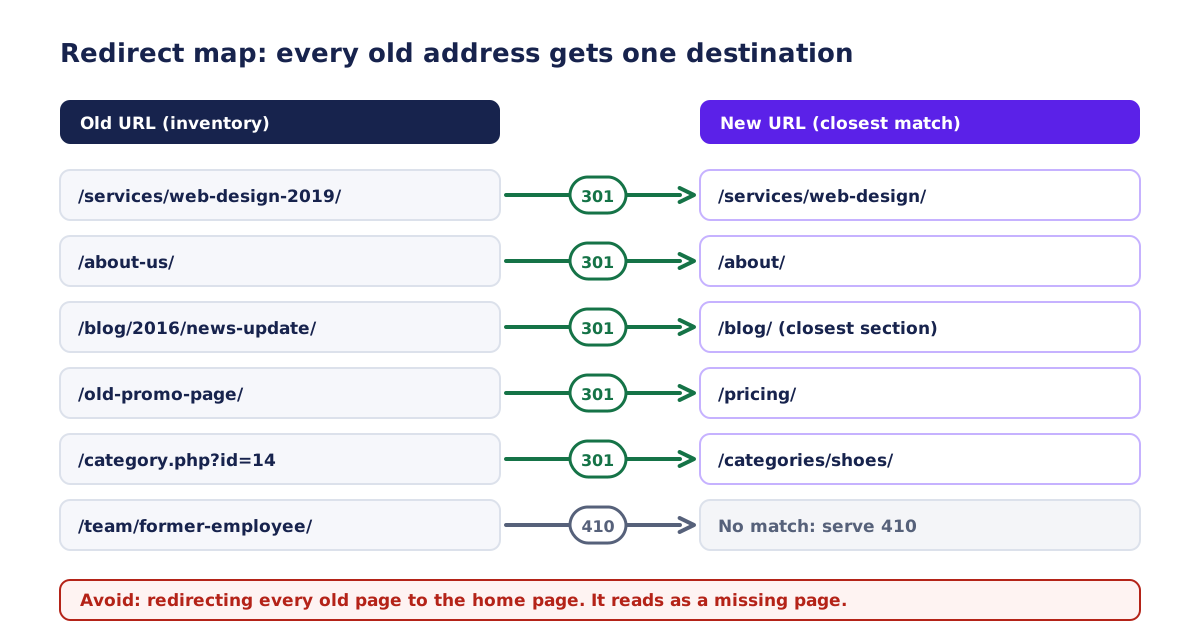
Old news items, expired offers and event pages can usually go. If an old page still has external links, redirect it to the closest relevant page. If nothing relevant exists, a 410 (gone) or a 404 is better than redirecting to the home page. Redirecting everything to the home page tells search engines the old topic no longer exists, and visitors who clicked a specific link land somewhere unrelated.
Step 4: map every old URL to a new URL
The redirect map is the single deliverable that most directly protects rankings. It is a table with two columns that matter: old URL and new URL. Every row is implemented as a permanent redirect on the server, not as a JavaScript redirect and not as a meta refresh.
Choose the right status code
| Code | Meaning | Use it when |
|---|---|---|
| 301 | Moved permanently | The page has a new permanent address |
| 308 | Permanent redirect that keeps the request method | A permanent move that must preserve POST requests (rare for content pages) |
| 302 / 307 | Temporary redirect | A short-term detour, for example a maintenance page |
| 404 | Not found | The address never existed or you have no replacement |
| 410 | Gone | The page was deliberately removed and will not return |
| 200 with a message | Soft 404 | Avoid: the server says OK for a page that is empty or missing |
For a permanent move use 301 (or 308). Using a temporary redirect for a permanent change can delay the transfer of signals to the new address. Search engines also handle redirects at the server level faster and more reliably than client-side tricks.
Avoid redirect chains and loops
A chain happens when A redirects to B and B redirects to C. After a redesign it is easy to create chains: the old URL redirects to an interim URL from a previous project, which redirects to the new one. Update the old rules so each address points straight to the final destination. Google documents that it follows a limited number of hops, and each hop adds delay for visitors. A loop (A to B to A) is an outright error.
Plan for patterns, not only single pages
Large groups of similar URLs are better handled with rules. For example, all /blog/2019/some-title/ addresses might become /insights/some-title/. Pattern rules reduce mistakes but need testing, because a rule that is too broad can send unrelated pages to the wrong place. Keep a short list of exceptions that override the patterns.
- Normalize the host: choose www or non-www and redirect the other to it
- Force HTTPS and redirect HTTP to HTTPS in a single hop
- Normalize trailing slashes and letter case
- Handle old query-string URLs, such as /page.php?id=12, with explicit rules
- Redirect image and PDF URLs only if they receive traffic or links
- Redirect old tag, author and date archives that you removed to the closest hub
Keep the redirects for a long time
Redirects should stay in place for as long as there are links to the old addresses, which in practice means years. Removing them after a few weeks sends visitors from old bookmarks and external links back to errors. A common minimum is at least a year, and keeping them indefinitely costs almost nothing.
Step 5: rebuild with content and structure parity
Parity means that each important page, at launch, contains what made the old page successful, even if the design is new. It does not mean copying every sentence. It means preserving topic coverage, main headings and the information a visitor needs to act.
Titles, headings and descriptions
Carry over the page title and main heading for protected pages unless you have a measured reason to change them. If the new design requires different wording, keep the main phrase visible in both. Meta descriptions do not directly affect rankings, but they influence clicks. Keep or improve them. A new template that accidentally outputs the same title on every page is a classic failure.
Body content
For each protected page compare the old and new text. Check that headings answering common questions remain, that tables and lists were not converted into images, and that important details such as service areas, pricing logic and contact paths are still written in text, not only in graphics.
Internal links and navigation
Rebuild the key internal links from the old crawl. Compare the number of internal links pointing to each protected page before and after. If a page lost most of its inlinks because a footer menu was removed, add contextual links from related pages and the main navigation.
Images, video and media
Keep descriptive file names and alt text for images that mattered in image search or carry meaning. Compress images, but keep the URLs stable if they receive traffic, or redirect them. Use width and height attributes to avoid layout shifts.
Structured data
If the old site had structured data (for example organization, breadcrumb or FAQ markup), rebuild it on the new templates and validate it. Do not add markup that does not match visible content.
| Element | Check | Pass when |
|---|---|---|
| Title tag | Compare old and new | Main phrase preserved and unique per page |
| H1 | Exactly one, descriptive | Matches the page topic |
| Main text | Compare word coverage and headings | Same questions answered |
| Internal links | Count inlinks old vs new | Not fewer without reason |
| Images | Alt text, size, lazy loading below the fold | Meaningful and light |
| Structured data | Validate | Present where it was and accurate |
| Canonical | Self-referencing on the final URL | Points to the live address |
| Mobile layout | Test on a phone | Content and buttons usable |
| Speed | Run lab and field checks | Not worse than the old page |
Step 6: technical requirements for the new site
Technical SEO for a small site is a short list, but each item must be correct at launch.
Crawlability and indexing
- The robots.txt file allows crawling of important sections and does not carry a leftover "Disallow: /" from staging
- No global noindex meta tag or X-Robots-Tag header remains from staging
- An XML sitemap lists only live, canonical, indexable pages with correct addresses
- The sitemap URL is referenced in robots.txt and submitted in Search Console
- Every indexable page has a self-referencing canonical on the production host
- A real 404 page returns a 404 status code and links to useful sections
Mobile and rendering
Google primarily uses the mobile version of a page for indexing. The mobile page must contain the same main content and structured data as the desktop page. Test key templates with the URL Inspection tool and view the rendered HTML. If the content you care about is missing there, fix it before launch.
Page experience and speed
Measure Core Web Vitals on the old site and on staging. The commonly used good thresholds, measured at the 75th percentile of real visits, are Largest Contentful Paint at or below 2.5 seconds, Interaction to Next Paint at or below 200 milliseconds and Cumulative Layout Shift at or below 0.1. Treat them as targets that your new site should at least match. Our website speed optimization service covers measurement and fixes if you need help.
Security and HTTPS
Serve the whole site over HTTPS with a valid certificate. Update internal links, canonicals, sitemaps and structured data to the HTTPS address. Mixed content (HTTP images on an HTTPS page) triggers warnings and can break layouts.
Pagination, filters and parameters
If the old site had paginated lists or filter parameters, define the behavior of the new one: which pages are indexable, which are noindex and how canonicals work. Do not allow infinite parameter combinations to generate crawlable pages.
| Subject | Relationship | Value |
|---|---|---|
| robots.txt on production | must not contain | a blanket Disallow for the whole site |
| Every indexable page | must declare | a self-referencing canonical on the production host |
| The sitemap | must list | only canonical, indexable, 200-status URLs |
| The mobile page | must contain | the same primary content as the desktop page |
| HTTP addresses | must redirect to | HTTPS in a single hop |
| The 404 page | must return | an HTTP 404 status, not 200 |
Step 7: use staging properly
A staging site is a private copy where the new design is built and reviewed. Done right, it lets you test everything before real visitors or search engines arrive. Done wrong, it leaks into search results or hides problems until launch.
Keep staging out of search
- Protect staging with a login or HTTP authentication; this is stronger than noindex alone
- Add noindex as a second layer, and remove it at launch as a deliberate step in the checklist
- Do not link to staging from public pages
- Use a separate subdomain or path that is easy to recognize
- Never copy staging robots.txt rules to production
Crawl staging like a search engine
Run the same crawler on staging that you ran on the old site. Compare the two crawls: status codes, titles, H1s, canonical tags, internal link counts and word counts per URL. Differences that you did not plan are bugs. This single comparison finds most redesign errors before launch.
Test redirects before they matter
Load the redirect map into a list-mode crawl. Feed the old URLs to the crawler on staging (or a test environment with the rules active) and check the final destination, the number of hops and the status codes. Fix mismatches in the spreadsheet, not in the server file, so the table stays the source of truth.
Test the business paths
- Submit every form and confirm the email or CRM entry arrives
- Click every phone number and email link on a phone
- Complete a test order or booking if you take them
- Check that thank-you pages trigger the right conversion events
- Open the site in at least two browsers and on an actual phone
- Test keyboard navigation and visible focus on the main pages
| Item | Old site | Staging | Action if different |
|---|---|---|---|
| Indexable URLs | Count from crawl | Count from crawl | Explain every removed URL in the redirect map |
| Title and H1 per URL | Exported | Exported | Restore for protected pages |
| Word count per URL | Exported | Exported | Investigate large drops |
| Internal links to key pages | Inlinks column | Inlinks column | Add contextual links |
| Status codes | 200, 301, 404 mix | Should be mostly 200 | Fix broken links |
| Page size and requests | From speed test | From speed test | Compress and defer |
Step 8: launch day runbook
A launch is a sequence of small, checkable actions. Write them down and assign each to a person. The goal is boring predictability.
Choose the moment
Launch on a weekday morning when someone can watch the site, not on a Friday afternoon or before a long weekend. Avoid your busiest week. Tell the team and any agencies that the launch is happening.
The launch sequence
- Back up the old site and database one more time
- Put the final content freeze notice in place and stop edits on the old site
- Deploy the new site to production
- Remove noindex and password protection from the production site (not from staging)
- Activate the redirect rules and test ten important old URLs by hand
- Replace robots.txt with the production version and confirm it allows crawling
- Publish the new XML sitemap and submit it in Search Console
- Confirm analytics, call tracking and conversion events fire on live pages
- Run a crawl of the live site and fix any 404s or redirect chains immediately
- Use URL Inspection on the home page and two protected pages, and request indexing if needed
- Test every form and the primary phone number again on production
- Announce completion and record the launch time for future comparison
| When | Tasks |
|---|---|
| Three to four weeks before | Baseline export, inventory, decisions, redirect map draft |
| Two weeks before | Staging crawl, parity review, redirect test, tracking test |
| One week before | Content freeze plan, backup plan, stakeholder briefing |
| Launch day | Runbook above, live crawl, Search Console submission |
| Day 1 to 3 | Daily checks of errors, indexing and conversions |
| Week 2 to 4 | Weekly review, fixes, compare against the baseline |
Step 9: the first 30 days after launch
Rankings and traffic will move after a redesign even when everything is done well. Search engines need time to recrawl, process redirects and reevaluate pages. Your job in this period is to find real problems quickly and to avoid overreacting to normal fluctuation.
What to watch and where
| Check | Tool | Frequency | Red flag |
|---|---|---|---|
| Crawl errors and 404s | Search Console Pages report, server logs | Daily in week 1 | Sudden growth in not found or server errors |
| Indexed pages | Search Console | Every few days | Large drop in indexed count |
| Redirect health | Crawler, list of old URLs | Weekly | Chains, loops, wrong destinations |
| Organic clicks for protected pages | Search Console | Weekly | A protected page loses most of its clicks |
| Conversions | Analytics or CRM | Daily in week 1 | Zero events where there were many |
| Core Web Vitals | Search Console, field data | Weekly (data lags) | Pages moving to poor |
| Server errors and uptime | Hosting dashboard, uptime monitor | Continuous | Any outage or slow responses |
What a normal dip looks like
A temporary dip or a period of unusual volatility in impressions and positions is common right after a significant site change. It does not necessarily indicate a mistake. The signs that something is wrong are specific: protected pages dropping out of the index, large numbers of new 404 or 5xx errors, or conversions falling to zero. General softness across many pages for a week or two, followed by recovery, is more often an adjustment period.
There is no honest way to promise a recovery time. Small sites with clean redirects often stabilize within weeks. Sites with large structural changes can take longer. Compare against your baseline, not against yesterday.
Fix in priority order
- Anything blocking indexing: robots.txt, noindex, server errors, broken canonicals
- Missing or wrong redirects for protected pages
- Lost internal links to key pages
- Content gaps on protected pages
- Speed regressions
- Everything else: polish, minor design issues, secondary pages
Update what you control outside the site
Update links you own: your Google Business Profile website link, social profiles, email signatures, directory listings and advertising landing pages. Where possible, ask partners and directories to update links to the new URLs so fewer visitors pass through redirects.
Changing the domain, hosting or platform at the same time
Every extra change makes problems harder to diagnose. Where you can, separate them: redesign first, move the domain later, or the other way around. When they must happen together, plan more carefully.
Changing the domain name
A domain change requires redirects from every old URL on the old domain to the matching URL on the new domain, plus use of the Change of Address tool in Search Console (available for domain-level moves). Keep the old domain registered and the redirects active for as long as possible. Expect a longer settling period than for a same-domain redesign.
Changing the CMS or platform
A new platform often changes URL structures by default (extensions, trailing slashes, category prefixes). Configure the new platform to reproduce the old URLs where it is sensible. If you must change them, update the redirect map accordingly. Export the content in a structured form so titles, descriptions and alt text survive the migration.
Changing hosting
A hosting move alone should not change rankings, but a slow or unstable server can. Keep the old host available for a few days after the DNS switch, lower DNS time-to-live values in advance and test the site through a hosts-file override before switching.
| Change | Extra care needed | Recommendation |
|---|---|---|
| Design only, same URLs | Low | Keep titles, headings and internal links stable |
| Design with new URL structure | Medium | Full redirect map and staging crawl |
| New platform | Medium to high | Export metadata, reproduce URLs, test rendering |
| New domain | High | Domain-level redirects, Change of Address tool, long monitoring |
| New domain and new platform and new design | Very high | Avoid combining; stage the changes over time |
Mistakes I see most often
These are the errors that account for most avoidable losses. Each one has a simple prevention step.
- Redirecting every old page to the home page instead of the closest match
- Forgetting to remove noindex or robots blocks after launch
- Leaving the staging site open to indexing
- Changing every title and heading without testing the effect
- Deleting old blog posts that still attract visitors
- Moving important text into images or scripts
- Launching without testing forms and tracking
- Letting redirect chains grow because old rules were never cleaned up
- Updating the site and not the Google Business Profile or external listings
- Judging success from one week of data
- Combining a domain change, a platform change and a redesign in one launch
- Removing redirects after a few months to "clean up"
- Ignoring mobile rendering during review
- Not saving the baseline, so nobody can say whether the result is better
- Skipping the content freeze and losing edits made on the old site during the build
The redesign SEO checklist
Print this list or copy it into your project tracker.
Before the build
- Export Search Console performance data for the full available period
- Export analytics landing pages and conversions
- Crawl the current site and save the files
- Build the URL inventory with traffic, links and conversions
- Decide keep, merge, retire or rewrite for every URL
- Draft the redirect map with one destination per old URL
- Define protected pages and their parity requirements
During the build
- Build on a protected staging site with noindex
- Reproduce titles, headings and key copy for protected pages
- Rebuild structured data and internal links
- Run a staging crawl and compare it with the old crawl
- Test redirects, forms, tracking and mobile layouts
- Measure speed and fix regressions
At launch
- Back up the old site
- Deploy, remove staging restrictions and activate redirects
- Check robots.txt, canonicals and the sitemap
- Submit the sitemap and inspect key pages in Search Console
- Crawl the live site and fix errors immediately
- Confirm conversions and phone numbers work
After launch
- Monitor errors, indexing, redirects and conversions daily in week one
- Compare protected pages against the baseline weekly
- Update external profiles and partner links
- Keep redirects in place for at least a year
- Schedule a review at 30, 60 and 90 days
How I handle redesigns
When I redesign a site, I start with the inventory and the redirect map before any design file is opened, and I put the structure map in front of you for approval so that nothing is removed by accident. My website redesign service includes URL mapping and a redirects plan, a staging link for review, launch checks and a short handover. I do not promise rankings, because no one can. I do promise that every decision about removed or moved pages is written down and agreed with you.
If you are not sure whether your site needs a full redesign or targeted fixes, a technical SEO audit can show what is holding it back first. You can also start a project brief and describe your current site.
Frequently asked questions
Will I lose my Google rankings if I redesign my website?
Not necessarily. Rankings are most at risk when URLs change without redirects, when important content is removed or when the new site is slower or harder to crawl. With a redirect map, content parity and testing, many redesigns keep their visibility. No process can guarantee it.
Do I need 301 redirects if I only change the design?
If every URL stays exactly the same, you do not need redirects for those pages. You still need them for any address that changes, including when a page moves from one section to another or when the platform changes URL formats.
How long should I keep redirects?
As long as the old URLs receive visits or links, which usually means at least a year. Keeping them longer costs almost nothing, so many sites leave them in place indefinitely.
Can I redirect everything to the home page?
It is a poor practice. Visitors who clicked a specific link land somewhere unrelated, and search engines may treat mass redirects to an unrelated page as soft errors. Redirect each old page to the closest relevant new page, and use 410 or 404 where there is no equivalent.
How long until traffic stabilizes after a launch?
It varies. Many small sites with clean redirects settle within a few weeks. Larger structural changes take longer. Judge success against your baseline over at least 30 to 90 days, not over a few days.
Should I redesign and change my domain at the same time?
Avoid it if you can. Each additional change makes problems harder to diagnose. If you must do both, plan domain-level redirects, use the Change of Address tool and monitor longer.
What if some old pages have no equivalent in the new site?
Decide whether the content is still useful. If it is, keep or rewrite it. If it is not, redirect to a closely related page when one exists, otherwise return 410 or 404. Do not force a redirect to an unrelated page.
What should I check first if traffic drops after launch?
Check indexing blockers first: robots.txt, noindex tags, server errors and canonicals. Then check redirects for your top pages, then internal links and content differences. Finally compare speed and tracking.

Website Redesign
An updated site that keeps what works: content, URLs and search visibility are planned before launch.
Independent web developer and SEO specialist since 2010. Based in Kyiv, Ukraine, working remotely with US businesses.
More about me