Google Business Profile: the basics that matter for local customers
Your profile often appears before your website. Learn who is eligible, how to set up and verify it, what to fill in, how to handle reviews and photos, and how to keep it accurate.

Quick answer: why your profile matters
When someone searches for a plumber, a dentist or a coffee shop near them, the first thing they usually see is not a website. It is a block of local results with names, ratings, hours, phone numbers and a map. Those results come from Google Business Profiles. For a business that serves customers in person or travels to them, the profile is often the first impression and, for many searches, the only one.
This guide covers the basics that matter most: who is eligible, how to set up and verify a profile, what to fill in and how, how to handle photos and reviews, how local ranking works in general terms and how to keep everything accurate over time. It is written for owners and managers of small local businesses in the United States, and the principles apply elsewhere.
| Subject | Relationship | Value |
|---|---|---|
| A Google Business Profile | is | a free listing that appears in Google Search and Google Maps |
| Eligible businesses | serve customers | in person at a location or by visiting them at their location |
| Virtual offices and PO boxes | are not | eligible locations for a profile |
| Google's local ranking | is described as based on | relevance, distance and prominence |
| The business name on the profile | must match | the real-world name used on signage and branding |
| A service-area business | can hide | its street address while listing the areas it serves |
| Reviews | must come from | genuine customers and cannot be bought, gated or faked |
| Profile information | should match | the website and other listings exactly |
Where a profile appears and how people use it
A profile can appear in several places: the local pack (the short list of businesses with a map in search results), Google Maps, the knowledge panel that shows when someone searches for your business by name, and in various Google features that connect search and maps. Customers use it to answer practical questions in seconds.
| Question | Where they find the answer | What you control |
|---|---|---|
| Are you open right now? | Hours and "open" status | Regular and special hours |
| Where are you, and how do I get there? | Address, pin and directions button | Address or service area, map pin accuracy |
| Can I call or message? | Call button, phone number | Primary phone number |
| Do you do what I need? | Categories, services, products, description | Services list and descriptions |
| Are you any good? | Photos, reviews and replies | Photos, review requests, replies |
| Where is the website? | Website button | The linked page |
Because so many decisions are made in the profile, accuracy matters more than cleverness. A wrong phone number or hours entry can cost real customers and produces negative reviews from people who arrived at a closed door.
Local pack versus organic results
The local pack and the regular website results are separate parts of the results page. A business can rank in one and not the other. Your website supports both, but the profile is the main way to appear in the local pack and on maps.
Who is eligible for a profile
Google's guidelines limit profiles to businesses that interact with customers in person during stated hours or that travel to customers. This protects the usefulness of local results, and it is enforced. Understanding eligibility before you start avoids a suspended profile later.
| Business type | Eligible? | Notes |
|---|---|---|
| Storefront with regular customer visits | Yes | Show the address and hours |
| Service-area business that travels to customers (plumber, cleaner, locksmith) | Yes | Can hide the address and list service areas |
| Hybrid (a location customers visit and also home visits) | Yes | Show the address and add service areas |
| Home-based business that meets customers at their location | Yes, as a service-area business | Hide the home address |
| Virtual office, mailbox or PO box | No | Not a place where customers are served in person |
| Online-only business with no in-person contact | No | Use your website and other channels |
| Rented space such as a coworking desk with no staffed hours for customers | Usually no | Customers must be able to interact in person |
| Marketing or lead generation entities for other businesses | No | Each real business can have its own profile |
If you are not eligible, do not try to work around the rules by inventing an address or using a friend's office. Profiles created that way are frequently suspended, and a suspension can be hard to reverse. A remote-only business, for example a web developer who works with clients by video call, is simply not the kind of business the product is designed for, and relies on its website and other channels instead.
Setting up and verifying your profile
Before you start
- Decide the exact business name you use publicly, and confirm it matches your sign, invoices and website
- Choose a Google account that belongs to the business and that more than one trusted person can recover
- Prepare the address (or service areas), a local phone number and a link to the most relevant page of your site
- Collect photos: exterior, interior, team and work examples
- Write the business description and a list of services
- Check whether a profile already exists: search your name and address, because duplicates cause problems
Creating or claiming
- Search for your business in Google Maps. If it appears, choose the option to claim or manage it. If it does not, add the business.
- Enter the business name, category and whether you serve customers at a location, go to their location, or both.
- Add the address, or choose the service area option and hide the address if customers do not visit you.
- Add the phone number and website.
- Complete the verification step that Google offers.
- After verification, fill in every remaining section.
Verification
Verification proves that the business is real and that you control it. Google offers different methods depending on the business and the situation, such as a postcard with a code, a phone call or text, an email, or a video recording of the location and signage. Which methods appear can change. Follow the instructions in the interface and avoid third parties who offer to verify profiles for a fee, because many of them break the rules and put the profile at risk.
| Situation | Tip |
|---|---|
| Postcard | Use the address exactly as written; it can take several days; do not request many cards |
| Video verification | Show the exterior, signage, the interior and proof that you operate there, as the instructions describe |
| Service-area business | You may be asked to show vehicles, tools and branded materials |
| Verification keeps failing | Check name and address consistency, and contact the official support channel |
| Someone else already claimed it | Request ownership through the official process; keep evidence of your business |
Business name, categories and description
The name
The name on your profile should be the name customers know you by: the one on your sign, website, invoices and packaging. Adding keywords, locations or taglines to the name violates the guidelines and can lead to edits or suspension. A business called "Smith Plumbing" should not appear as "Smith Plumbing Best Cheap Plumber Orlando".
| Do | Don't |
|---|---|
| Use the real name from your signage | Add keywords such as "best" or "cheap" |
| Include a descriptor only if it is part of the real brand | Add the city or service just to rank |
| Keep punctuation and capitalization consistent with your brand | Use all caps or symbols for attention |
| Update the name everywhere if you rebrand | Change the profile name before the real signage changes |
The primary and additional categories
Categories tell Google what your business is. The primary category is among the most important profile settings for relevance. Choose the one that most precisely describes your main business, then add additional categories for real secondary services. Categories are from a fixed list, so browse it rather than guessing.
- Choose the most specific category that fits, not the most general
- Use additional categories for services you genuinely provide, not for services you would like to attract
- Look at the categories used by well-ranked competitors for ideas, but only select the ones that are accurate for you
- Review categories occasionally because the list and best choices evolve
The business description
The description is a short text, limited to a few hundred characters (currently 750), that explains what you do. It cannot contain links or promotional claims such as limited-time offers, and it should be written in plain language. Say what you offer, whom you serve, where and what is distinctive. Do not stuff keywords.
Example structure: a sentence on the main service and customers, a sentence on the area served, a sentence on a real differentiator such as years of experience or licensing, and a closing sentence on how to book. Replace this with your own facts.
Address or service area, and the map pin
Customers must be able to find you. How you present your location depends on how you serve customers.
| If you... | Show | Do |
|---|---|---|
| Serve customers at your premises | The address and a precise map pin | Check the pin position and entrance details |
| Travel to customers only | Service areas, hide the address | List the cities, ZIP codes or regions you truly serve |
| Do both | The address and service areas | Make clear which services are offered where |
Service areas
List the places you actually serve, within a realistic distance of your base, and keep the list limited to the number Google allows (currently up to 20 areas). Listing places you do not serve adds no value and can mislead customers. You can name cities, regions or postal codes.
Pin accuracy and attributes
Make sure the pin sits on the right building, and add details that help visitors, such as entrance instructions, parking, floor or suite number and accessibility features. Mistakes in the pin location produce wrong directions and unhappy customers.
Hours, phone number and website link
Hours
- Enter regular hours accurately for each day
- Add special hours for holidays and events before they happen
- Use the temporary closure option instead of marking the business permanently closed
- If you have different hours for specific services, such as pickup or delivery, add them where the interface allows
- Review hours after daylight-saving changes and seasonal schedule changes
Phone
Use a local phone number that is answered during your listed hours. If you use call tracking, set the tracking number as primary and your real number as additional, so that the real number stays visible in the information that search engines collect. Make sure the number matches the one on your website.
Website and other links
Link to the page that best serves the customer: the home page for a single-location business, or the specific location page for a multi-location business. Add tracking parameters if you want to measure visits from the profile separately. You can also add appointment, ordering or menu links where those features exist.
| Business setup | Best link |
|---|---|
| One location | The home page, or a location page if it is richer |
| Several locations | The page for that specific location |
| Restaurant | The menu page; add the reservation link separately |
| Service business | The main service page or home page, with a clear call to action |
| Booking-based business | The booking page, plus the website link |
Services, products and attributes
The more precisely your profile describes what you do, the easier it is for Google to match you to searches and for customers to decide. Use the sections that apply to your business.
| Section | How to use it | Tip |
|---|---|---|
| Services | List each service with a short description and, if you can, a price or price range | Use customer language; keep names consistent with your website |
| Products | Add main products with photos and a description | Keep prices current |
| Menu | For food businesses, link or add the menu | Keep it identical to the website menu |
| Attributes | Select all that apply, such as accessibility, payment types or amenities | Accuracy matters more than quantity |
| Opening date | Add the date you opened | Builds a sense of history |
| Booking and appointment links | Connect your scheduler | Test the link on a phone |
Keep service names and descriptions consistent with your website. If the site calls a service "emergency plumbing" and the profile says "urgent pipe repair", visitors and algorithms see two different things. Use one vocabulary.
Photos and video
Profiles with real, recent photos tend to inspire more trust, and photos are among the most viewed parts of a profile. Treat them as a showcase.
| Type | What to show | Notes |
|---|---|---|
| Logo | Your logo on a clean background | Square and legible at small sizes |
| Cover photo | Your best representative image | Often the first image seen |
| Exterior | The building, entrance and signage from the street | Helps people recognize the place |
| Interior | The space customers will see | Tidy, well lit |
| Team | Real staff at work | With their permission |
| Work | Finished jobs, products, dishes, results | Add variety and real examples |
| Video | A short walkthrough or introduction | Keep it short and honest |
Technical guidance
- Use JPG or PNG files that are sharp and reasonably sized (Google publishes minimum and maximum sizes; check the current guidance)
- Avoid heavy filters, text overlays, collages and stock images
- Photograph in natural light and from several angles
- Add new photos regularly, for example monthly
- Never upload photos of other businesses' work as your own
Photos from customers
Customers can add photos too. You cannot control them, but you can encourage good ones by making your business easy to photograph and by thanking people who share. If a customer photo violates the guidelines, you can report it.
Reviews: earning them, answering them and following the rules
Reviews influence both customer decisions and local visibility. They also come with strict rules. The way you ask and respond shapes your reputation more than any single review does.
How to ask
- Ask every satisfied customer, at the right moment: after the job is done, at checkout or after a follow-up call
- Share the direct review link from your profile so customers can leave a review in one or two taps
- Ask in person, by text or by email with a short, friendly message
- Make it easy, but never pressure
- Thank people regardless of the rating
What the rules prohibit
| Practice | Why it is a problem |
|---|---|
| Buying or trading reviews | Fake reviews violate the guidelines and consumer protection rules |
| Writing reviews yourself or through employees and relatives | Conflicts of interest and fake content |
| Offering discounts or gifts for positive reviews | Incentives that bias ratings are not allowed |
| Review gating (asking only happy customers to review) | Selective solicitation is prohibited |
| Posting reviews of competitors to harm them | Defamation and policy violation |
| Using review-generation services that submit reviews for you | Often violates policy and risks removal or suspension |
Regulators also act against fake reviews. In the United States, for example, the Federal Trade Commission has rules against buying, selling or faking reviews. Ask a lawyer if you are unsure about a practice.
How to reply
Reply to every review you can, especially the negative ones. A calm, specific answer shows prospective customers how you treat people. Keep answers short and professional, avoid sharing private details and take detailed conversations offline.
| Review type | How to respond |
|---|---|
| Positive | Thank them by name, mention something specific, invite them back |
| Mixed | Thank them, acknowledge the concern, say what you are doing about it |
| Negative with a real issue | Apologize without excuses, explain what you will do, give a direct contact |
| Negative that looks fake or off-topic | Reply politely if useful and flag it through the official process |
| Review with abusive content | Flag it; do not engage in arguments |
Updates, offers and events
Profiles can carry short updates, offers and event announcements. They are not a substitute for a website blog, but they keep the profile active and give customers current information.
- Share seasonal hours, new services, promotions and events
- Use a clear photo and a short text with a button when available
- Keep offers accurate and remove them when they expire
- Do not use updates to make claims you cannot support
The features available in profiles change from time to time, including how customers can message a business or ask questions. Check the options that currently appear in your profile and use only those you can support consistently.
How local ranking works in general terms
Google has described local results as depending mainly on three things: relevance (how well a profile matches the search), distance (how far the business is from the searcher or the location in the search) and prominence (how well known and trusted the business appears, based on information such as reviews, links and mentions across the web). You cannot change distance, but you can influence relevance and prominence.
| Factor | What it means | What you can influence |
|---|---|---|
| Relevance | How well the profile matches the query | Accurate categories, services, description, website content |
| Distance | How close the business is to the searcher | Nothing directly; keep your location and service areas accurate |
| Prominence | How established the business is | Reviews, quality mentions and links, a strong website, consistent listings |
No one can promise a position, and anyone who does is guessing. What works is steady accuracy, genuine customer feedback and a website that supports your claims.
Consistency across the web and your website
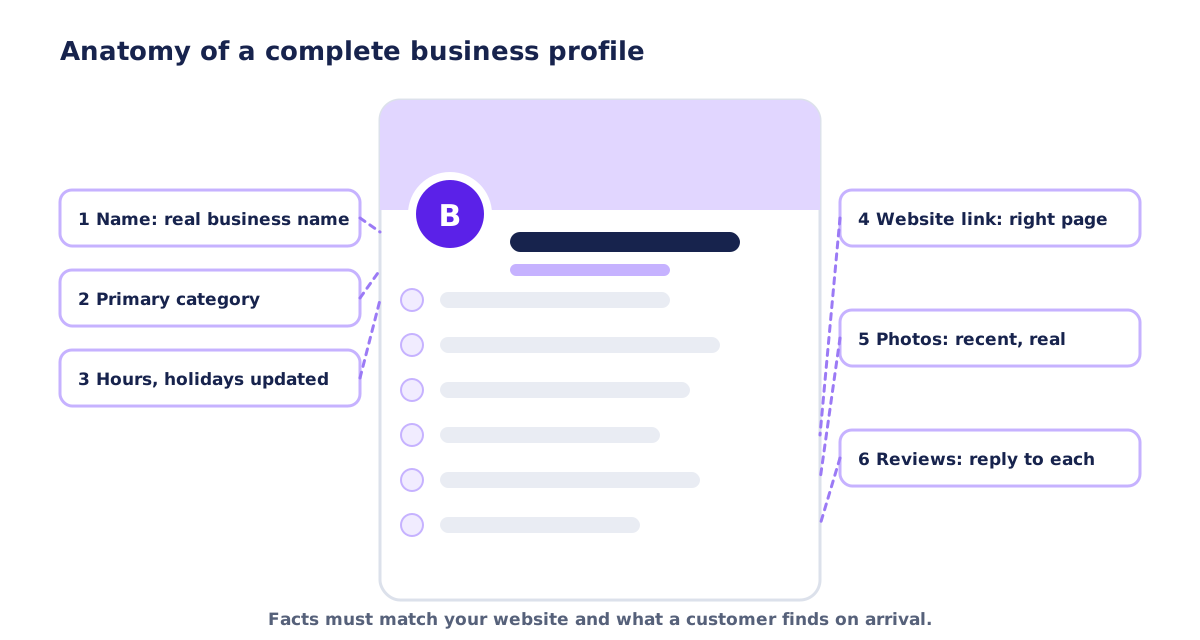
Your business name, address and phone number (often abbreviated NAP) appear on your profile, your website and many directories. Consistent information helps search engines trust it and helps customers find you.
Directories and citations
- Claim and complete the main directories relevant to your industry and region
- Use exactly the same name, address format and phone number everywhere
- Check Bing Places and Apple Business Connect, which feed other maps and assistants
- Remove or merge duplicate listings
- Update every listing whenever you move or change your phone number
What your website should do
- Show your name, address (if public), phone number and hours in text, on the contact page and in the footer
- Have a page for each important service and each location you really serve, with unique content
- Embed a map on the contact page if you have a physical location
- Use structured data for a local business only when it accurately describes a real local business with real details
- Make the website load fast and work well on phones
- Mention the areas you serve in natural language
| Item | Where to check | Common mistake |
|---|---|---|
| Business name | Profile, website, directories | Added keywords on one listing |
| Address format | Everywhere | Suite number or abbreviations differ |
| Phone number | Everywhere | A tracking number replaces the real number |
| Hours | Profile, website, directories | Holiday hours updated in one place only |
| Website link | Profile, directories | Links to an old or redirected page |
| Category and description | Profile, directories | Different wording per platform |
Local pages on your website that support the profile
Your profile points customers to your website, and the website explains and proves what the profile claims. For a local business this usually means a few well-built pages rather than a large site.
The service pages
Create one page per main service, each with a clear explanation of what you do, how it works, what affects the price and how to get started. A person who clicks from the profile for "water heater replacement" should land on a page about water heater replacement, not on a general home page that makes them search.
Location pages for places you really serve
If you have more than one location, give each its own page with its own address, phone number, hours, directions, photos and local details. If you are a service-area business, you can create pages for the main cities or areas you serve, but only when you have something real to say for each: the kinds of jobs you do there, local regulations or conditions that matter, typical response times you can keep and examples of work. Pages that repeat the same text with a different city name add little value and can be treated as thin or duplicate content.
| Useful local page | Thin local page |
|---|---|
| Specific information about the area or location | The same paragraph with the city name swapped |
| Real photos and examples of work nearby | Stock images only |
| Accurate address, hours and directions | Missing or inconsistent contact details |
| Links to the relevant services | A list of nearby towns with no content |
| Clear way to contact or book | No call to action |
Contact page
The contact page should list your name, address if public, phone number, email, opening hours and a form. If customers visit you, add directions, parking information and a map. Make the phone number a tappable link on mobile.
Trust content
- Licenses, insurance and certifications you hold
- A short, real About page with people and a story
- Genuine customer feedback with permission
- Clear policies for pricing, guarantees and cancellations
- Photos of real work with short captions
These pages support the claims in your profile and help visitors who want to verify you before calling. They also give search engines more consistent information about who you are and where you operate.
Special situations
More than one location
Each real location with customer contact can have its own profile, with its own address, phone number and hours. Keep names consistent and add a location descriptor only if it is part of the real name. Link each profile to its own location page. Avoid creating profiles for locations that are not staffed during stated hours.
Seasonal businesses
If you close for part of the year, use the temporary closure option or special hours rather than marking the business permanently closed. Update the profile before the season changes and say when you reopen in an update.
Moving or rebranding
When you move, update the address on the profile and in every listing, and update your website and any printed materials. If you rebrand, change the name on the profile after the signage and legal name change so the profile reflects the real-world business. Keep old names in mind for searches: a short note on the website can help people connect the two.
Changing ownership or closing
When a business is sold, make sure ownership of the profile transfers to the new owner through the official process, and remove access for people who no longer work with the business. If you close permanently, mark the profile as closed rather than leaving false hours online.
Sensitive and regulated industries
Businesses in health, legal, financial and similar fields should be especially careful with claims and with how they handle reviews and personal information. Do not disclose private details in replies, follow your professional rules for advertising and testimonials, and ask a qualified adviser if you are unsure.
| Situation | What to do | What to avoid |
|---|---|---|
| Multiple locations | One profile per staffed location, each linked to its page | Profiles for unstaffed or virtual locations |
| Seasonal closure | Temporary closure or special hours | Marking the business permanently closed |
| Relocation | Update address everywhere | Leaving the old address on directories |
| Rebrand | Change the name when the real signage changes | Changing the profile name early |
| Sale or handover | Transfer ownership officially | Sharing a personal login |
| Closure | Mark as permanently closed | Leaving false hours |
Measuring the results
The profile includes performance information such as how people found you and what they did: calls, direction requests, website clicks and sometimes messages or bookings. Use it together with your website analytics.
| Metric | Where | How to use it |
|---|---|---|
| Profile views and searches | Profile performance | Trends over months, not days |
| Calls | Profile performance, call tracking | Compare with the number of real leads |
| Direction requests | Profile performance | Indicates local intent |
| Website clicks | Profile performance, analytics with tracking parameters | Shows how many visits start in the profile |
| Review count and rating | Profile | Track the pace of new reviews |
| Branded search queries | Search Console | Shows awareness of your business name |
Seasonality is strong in local businesses, so compare with the same period of the previous year when possible. Note what you changed and when, so you can connect actions to results.
Common problems and how to handle them
| Problem | Likely cause | What to do |
|---|---|---|
| Profile suspended | Ineligible address, name changes, repeated edits or policy violations | Read the notice, correct the issue and use the official reinstatement process |
| Duplicate profiles | Old listings, a moved business, a previous owner | Claim and mark duplicates for removal or merging through the official tools |
| Wrong pin or address | Imprecise geocoding | Edit the address and drag the pin to the right place |
| Unwanted edits by others | Suggested edits from users or algorithms | Review suggestions and revert; keep your information current |
| Marked permanently closed | Mistaken report or setting | Correct the status; ask for a review if needed |
| Moved premises | Business relocated | Update the address on the profile and every listing, and notify customers |
| Fake or abusive reviews | Competitors or unhappy individuals | Flag them and keep evidence; respond calmly |
| Can't verify | Mismatch between name and address | Make details consistent; try another verification option |
When something goes wrong
Stay calm and use only official channels. Keep a record of the changes you made and of screenshots of the issue. Avoid editing repeatedly while a profile is under review, because frequent changes can trigger additional checks.
Mistakes small businesses make with their profile
- Adding keywords or the city to the business name
- Choosing a general primary category instead of the most specific accurate one
- Listing a home address that customers do not visit instead of hiding it as a service-area business
- Leaving holiday hours unchanged and being closed when the profile says open
- Using a tracking number as the only phone number
- Linking to a page that has been redirected, removed or does not match the service
- Uploading stock photos or old photos that no longer match the business
- Asking only happy customers for reviews, or paying for reviews
- Ignoring negative reviews or replying defensively
- Creating a second profile instead of claiming the existing one
- Never checking the profile after setup
- Sharing a personal login instead of adding managers with their own access
| Term | Meaning |
|---|---|
| Local pack | The short list of local businesses with a map shown in search results |
| Knowledge panel | The information box that appears when someone searches for a business by name |
| Primary category | The main business type selected on the profile |
| Service-area business | A business that travels to customers and may hide its address |
| NAP | Name, address and phone number, kept consistent across the web |
| Citation | A mention of the business details on another site or directory |
| Prominence | How well known and trusted a business appears across sources |
| Suspension | A state in which a profile is removed from public view until a problem is fixed |
A short list of rules to remember
- Be eligible: a real place customers visit, or a real service area you travel to
- Use your real business name only
- Keep hours, phone and links accurate at all times
- Describe what you do in plain language, without keyword stuffing
- Use real photos
- Earn reviews honestly and reply to them
- Do not create multiple profiles for the same business
- Keep information identical across the web
- Check the profile regularly, especially before holidays
A 30-day plan
| Week | Focus | Actions |
|---|---|---|
| 1 | Eligibility, ownership and accuracy | Search for existing profiles, claim or create, verify, fix name, address or service area, phone and hours |
| 2 | Content | Choose categories, write the description, add services, products and attributes |
| 3 | Visuals and reviews | Upload real photos, set up a review request routine, reply to existing reviews |
| 4 | Consistency and tracking | Align directories and the website, add tracking parameters, set a monthly review |
A monthly routine
- Check hours, especially around holidays
- Add at least a few new photos
- Reply to every new review
- Review the performance numbers and note trends
- Update services or offers
- Search for your business name and main services to see how the profile looks
If you are not eligible for a profile
Some businesses, for example remote service providers and online-only shops, cannot use a Google Business Profile because customers are not served in person. That does not leave you without options. Put your effort into the website, clear service pages, helpful content, consistent directory listings where they apply, genuine reviews on platforms that accept them and links and mentions from relevant sites. Be wary of anyone who proposes creating a fake address to get a profile.
How I can help
I help small businesses make sure their website and online information line up, because a profile and a website that tell the same story perform better than either alone. A technical SEO audit can include a review of how your site supports local search, and my website design work includes the contact and service pages that profiles link to. You can also send a brief with your website address and I will tell you what I would check first.
Frequently asked questions
Is Google Business Profile free?
Yes. Creating and managing a profile is free. Be cautious about any company that charges to "get you listed" or to verify your profile.
Can I have a profile if I work from home?
Yes, if you serve customers at their locations or meet them in person during stated hours. Home-based service businesses usually hide the home address and list service areas.
Can I use a PO box or virtual office?
No. A profile needs a location where customers can interact with the business in person, or a legitimate service area business that travels to customers.
How many categories can I add?
One primary category and a number of additional ones from Google's list. Choose the ones that accurately describe your services. The exact limits and category list can change, so check the interface.
How do I get more reviews?
Ask every satisfied customer at the right moment and share your direct review link. Do not offer incentives, write reviews yourself or ask only happy customers. Reply to reviews you receive.
Can I remove a bad review?
Not simply because it is negative. You can flag reviews that violate the policies, such as fake, off-topic or abusive content. Otherwise reply professionally.
Do posts and updates improve my ranking?
Updates keep the profile current and useful to customers, but they are not a shortcut to a better position. Focus on accuracy, reviews and a strong website first.
Why was my profile suspended?
Common reasons include an ineligible address, a name that includes keywords, a mismatch between the profile and the real business or repeated rule violations. Read the notice, fix the cause and use the official reinstatement process.

Technical SEO Audit
A prioritized list of technical issues (indexing, structure, metadata) with what to fix first.
Independent web developer and SEO specialist since 2010. Based in Kyiv, Ukraine, working remotely with US businesses.
More about me